PowerEdge: TPM shows as Type '???-NTC'
Summary: The motherboard has lost connectivity to the TPM. The operation system can no longer see it, and the BIOS presents it as Type: '???-NTC'. Power drain (Full Power Cycle using BIOS or physical unplug of power) will resolve. ...
This article applies to
This article does not apply to
This article is not tied to any specific product.
Not all product versions are identified in this article.
Symptoms
The operating system no longer shows the TPM as present even though it was installed and working fine previously. Further, checking either BIOS - either in the iDRAC or directly booting in - shows up as '???-NTC' under TPM Information.
This can be verified both under the iDRAC BIOS settings (Configuration -> BIOS Settings -> System Security) or using the F2 boot (System Setup -> BIOS Settings -> System Security)
For systems configured with Secure Boot, this can prevent the operating system from fully booting.
Cause
The system board has lost communication with the TPM.
This has only been seen and reported in the field only on 14G based PowerEdge as of February 2023.
Resolution
A power drain resolves the issue.
This can be either achieved remotely using the Full Power Cycle in the BIOS or a physical power drain.
The Full Power Cycle is under the BIOS's Miscellaneous settings. 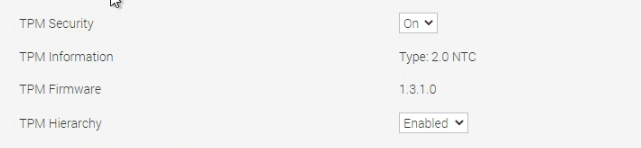
If customers continue to have the Security Violation PSOD after this, then please investigate for a different cause.
TPM BIOS settings may need to be corrected as sometimes this gets reset to defaults.
Affected Products
PowerEdge R640, PowerEdge R740, PowerEdge R740XDArticle Properties
Article Number: 000207762
Article Type: Solution
Last Modified: 30 Jan 2025
Version: 4
Find answers to your questions from other Dell users
Support Services
Check if your device is covered by Support Services.