PowerEdge:TPM 显示为类型???-NTC'
Summary: 主板已失去与 TPM 的连接。作系统无法再看到它,BIOS 将其显示为类型:'???-NTC'。释放电量(使用 BIOS 或物理拔下电源进行完全电源重启)将会解决。
This article applies to
This article does not apply to
This article is not tied to any specific product.
Not all product versions are identified in this article.
Symptoms
即使 TPM 之前已安装并工作正常,作系统也不再将 TPM 显示为存在。此外,检查 BIOS(在 iDRAC 中或直接启动)会显示为”???-NTC“在 TPM 信息下。
这可以在 iDRAC BIOS 设置(配置 ->BIOS 设置 ->系统安全)下或使用 F2 启动(系统设置 ->BIOS 设置 ->系统安全)进行验证。
对于配置了安全启动的系统,这可能会阻止作系统完全启动。
Cause
系统主板与 TPM 的通信中断。
截至 2023 年 2 月,仅在基于 14G 的 PowerEdge 上看到并报告了这种情况。
Resolution
释放残余电量可解决问题。
这可以使用 BIOS 中的“Full Power Cycle”或物理电源释放来远程实现。
“Full Power Cycle”位于 BIOS 的“Miscellaneous”设置下。 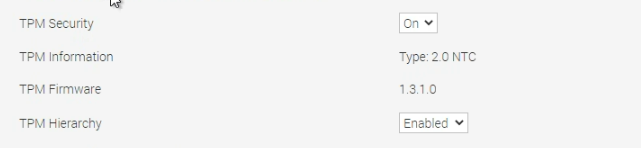
如果客户在此之后仍然具有安全违规 PSOD,请调查其他原因。
可能需要更正 TPM BIOS 设置,因为有时会重置为默认值。
Affected Products
PowerEdge R640, PowerEdge R740, PowerEdge R740XDArticle Properties
Article Number: 000207762
Article Type: Solution
Last Modified: 30 Jan 2025
Version: 4
Find answers to your questions from other Dell users
Support Services
Check if your device is covered by Support Services.