NetWorker:新しいクライアントの作成が「is not a valid hostname as it cannot be resolved in DNS」というメッセージで完了しない
Summary: NetWorker 19.7.0.3の[New Client Properties]を使用してクライアントを追加しても完了せず、「Name is not a valid hostname as it cannot be resolved in DNS. DNSまたはホスト ファイルに追加し、NetWorkerサーバーのDNSキャッシュ(dbgcommand -p FlushDnsCache)をフラッシュしてください。 ...
This article applies to
This article does not apply to
This article is not tied to any specific product.
Not all product versions are identified in this article.
Symptoms
NetWorker 19.7.0.3の [New Client Properties ]を使用してクライアントを追加しても完了せず、次のエラーが表示されます。
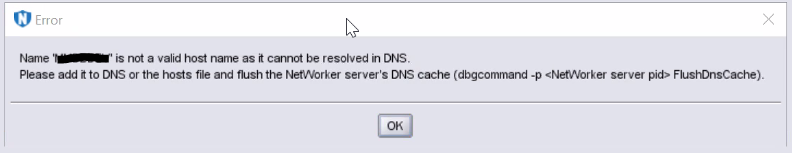
図1: エラー メッセージのスクリーンショット
Name  is not a valid host name as it cannot be resolved in DNS.
Please add it to DNS or the hosts file and flush the NetWorker server's DNS cache (dbgcommand -p  FlushDnsCache).
図1: エラー メッセージのスクリーンショット
Cause
ホスト名は、DNSまたは「hosts」ファイルを介して名前解決に失敗します。
ホスト名が解決された場合でも、このエラー メッセージが以前に発生した場合、NetWorker DNSキャッシュはクライアントの追加を禁止します。
Resolution
クライアントホスト名をDNSに追加するか(正引きと逆のエントリー)、または次の形式で「hosts」ファイルに追加します。
IP Address [space/tab] FQDN [space/tab] Short Name
NetWorker DNSキャッシュを「フラッシュ」するには、次の手順に従います。
- 以下のコマンドを使用して、「nsrd」および「nsrexecd」プロセスのPIDを取得します。
Windowsの場合:
tasklist | findstr nsrd.exe
tasklist | findstr nsrexecd.exe
Linuxの場合
ps -e | grep nsrd
ps -e | grep nsrexecd
- 「nsrd」と「nsrexecd」のPIDに対して次のコマンドを実行し、次のようにスイッチを使用します。
dbgcommand -p FlushDnsCache
Article Properties
Article Number: 000212659
Article Type: Solution
Last Modified: 29 Jun 2023
Version: 3
Find answers to your questions from other Dell users
Support Services
Check if your device is covered by Support Services.