PowerFlex 4.X Webhook Errors During Connection Test
Summary: When creating a Webhook destination for alerts with PowerFlex 4.5 and above, it errors out when testing the Webhook connection.
This article applies to
This article does not apply to
This article is not tied to any specific product.
Not all product versions are identified in this article.
Symptoms
- A notification destination using Webhook has been created.
- The "Enable Credentials" has not been toggled on.
- The destination is using https along with an IP address.
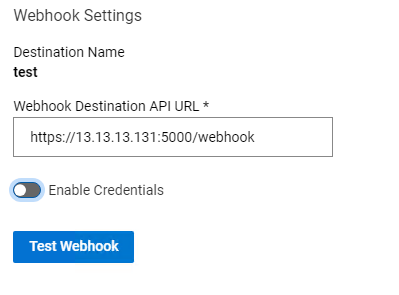
- When clicking the "Test Webhook" button, this error pops up:
Webhook test failed!
Unknown Exception occurred while running the dispatcher.
- The PowerFlex notifier pod logs from a troubleshooting bundle show the following:
 2024-01-29T12:32:27.476013229-06:00 stdout F {"name": "notifier", "time": "2024-01-29 18:32:27", "level": "WARNING", "message": "Certificate did not match expected hostname: 13.13.13.131. Certificate: {'subject': ((('countryName', 'US'),), (('stateOrProvinceName', 'Texas'),), (('organizationName', 'Dell Technologies'),), (('commonName', 'webhook.pfxm.local'),))
..
2024-01-29T12:32:27.477045382-06:00 stdout F {"name": "events-topic-listener", "time": "2024-01-29 18:32:27", "level": "ERROR", "service_instance_id": "b00635f6ca835c02", "message": "Connection Error occurred during webhook forwarding."}
2024-01-29T12:32:27.477062648-06:00 stdout F Traceback (most recent call last):
2024-01-29T12:32:27.477068501-06:00 stdout F   File "/usr/lib/python3.10/site-packages/urllib3/connectionpool.py", line 699, in urlopen
2024-01-29T12:32:27.477072836-06:00 stdout F     httplib_response = self._make_request(
2024-01-29T12:32:27.477077569-06:00 stdout F   File "/usr/lib/python3.10/site-packages/urllib3/connectionpool.py", line 382, in _make_request
2024-01-29T12:32:27.477081821-06:00 stdout F     self._validate_conn(conn)
2024-01-29T12:32:27.477086049-06:00 stdout F   File "/usr/lib/python3.10/site-packages/urllib3/connectionpool.py", line 1010, in _validate_conn
2024-01-29T12:32:27.477090425-06:00 stdout F     conn.connect()
2024-01-29T12:32:27.477094406-06:00 stdout F   File "/usr/lib/python3.10/site-packages/urllib3/connection.py", line 464, in connect
2024-01-29T12:32:27.477098821-06:00 stdout F     _match_hostname(cert, self.assert_hostname or server_hostname)
2024-01-29T12:32:27.477102754-06:00 stdout F   File "/usr/lib/python3.10/site-packages/urllib3/connection.py", line 512, in _match_hostname
2024-01-29T12:32:27.477106666-06:00 stdout F     match_hostname(cert, asserted_hostname)
2024-01-29T12:32:27.477110933-06:00 stdout F   File "/usr/lib/python3.10/site-packages/urllib3/packages/ssl_match_hostname/_implementation.py", line 151, in match_hostname
2024-01-29T12:32:27.4771152-06:00 stdout F     raise CertificateError(
Cause
Impact
Alerts will not be sent to the Webhook destination.
Root Cause
In this case, there are two reasons for the failure here.
- A Webhook destination must have credentials enabled.
- The SSL certificate on the Webhook destination did not have the IP address as one of the subject alternative names, so all SSL connection attempts were rejected.
Resolution
Workaround
When configuring a Webhook destination for alerts:
- Ensure the "Enable Credentials" is toggled on and there are credentials filled out.
PowerFlex Manager 4.x needs credentials with a Webhook destination, even if the Webhook API receiver does not need credentials. In the case where no credentials are needed, bogus credentials can be used.
- When using an https (not plain http) Webhook destination, an SSL certificate is used. Typically, these will only have the DNS or FQDN in the Subject Alternative Name of the SSL certificate. Therefore, when an IP address tries to connect, the SSL connection attempt is rejected. Use a DNS or FQDN that matches what the SSL certificate is looking for in the Webhook Destination API URL.
Impacted Versions
PowerFlex Manager 4.5 and above
Fixed In Version
Working as designed
Affected Products
PowerFlex appliance connectivityProducts
PowerFlex rack, VxFlex Ready Nodes, PowerFlex custom node, PowerFlex appliance R650, PowerFlex appliance R6525, PowerFlex appliance R660, PowerFlex appliance R6625, Powerflex appliance R750, PowerFlex appliance R760, PowerFlex appliance R7625
, PowerFlex appliance R640, PowerFlex appliance R740XD, PowerFlex appliance R7525, PowerFlex appliance R840
...
Article Properties
Article Number: 000221795
Article Type: Solution
Last Modified: 10 Feb 2025
Version: 2
Find answers to your questions from other Dell users
Support Services
Check if your device is covered by Support Services.