Web Protection Failed to Block URLs After Chromium Browser Update
Summary: On September 8, 2023, Chrome version 117 introduced a new browser extension permission that must be enabled to allow web protection to function properly.
This article applies to
This article does not apply to
This article is not tied to any specific product.
Not all product versions are identified in this article.
Symptoms
Note:
- As of May 2022, Dell Endpoint Security Suite Enterprise has reached End of Maintenance.
- As of January 2019, Dell Endpoint Security Suite Pro has reached End of Service.
- For more information, reference Product Life Cycle (End of Support and End of Life) Policy for Dell Data Security.
- If you have any questions on alternative articles, either reach out to your sales team or contact endpointsecurity@dell.com.
- Reference Endpoint Security for additional information about current products.
Affected Products:
- Dell Endpoint Security Suite Enterprise
- Dell Endpoint Security Suite Pro
Cause
Starting in Chrome version 117 and later, a new browser extension permission called Allow access to file URLs must be enabled for the web protection component (Trellix Endpoint Security Web Control) of Dell Endpoint Security Suite Enterprise and Dell Endpoint Security Suite Pro to block sites properly.
Resolution
This new browser extension permission can be enabled manually on the endpoint or, by enforcing this permission to be enabled using Group Policy Editor (GPO).
Enable manually directly on the endpoint
- Open a Chromium browser and click the three dots at the upper right corner.

Figure 1: Chromium browser settings
- Click Extensions then click Manage Extensions

Figure 2: (English Only) Click Manage Extensions
- Click Details under the Trellix Endpoint Security Web Control extension.

Figure 3: (English Only) Click Details
- Scroll down and click the toggle next to Allow access to file URLs.

Figure 4: (English Only) Enable Allow access to file URLs
Blocking should now work as expected.
Enable allow access to file URLs using GPO
Note: If you have not added the group policy template to enable management of chrome using GPO, they can be found in the following Google support article
 .
.
.
- Edit or create a new GPO and go to Google > Google Chrome > Extensions.
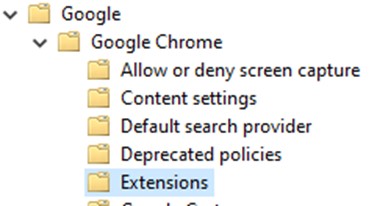
Figure 5: (English Only) Edit or create a GPO for Google Extensions
- Enable the Extension management settings policy and place the JSON below in the extension management settings field.
{ "jjkchpdmjjdmalgembblgafllbpcjlei": { "file_url_navigation_allowed": true }}

Figure 6: (English Only) Add JSON to Extension management settings
To contact support, reference Dell Data Security International Support Phone Numbers.
Go to TechDirect to generate a technical support request online.
For additional insights and resources, join the Dell Security Community Forum.
Affected Products
Dell Endpoint Security Suite Pro, Dell Endpoint Security Suite EnterpriseArticle Properties
Article Number: 000222125
Article Type: Solution
Last Modified: 16 Feb 2024
Version: 2
Find answers to your questions from other Dell users
Support Services
Check if your device is covered by Support Services.