Name field in NSRLA has a hash character for AIX client.
Summary: Name field in NSRLA has a hash character for AIX client. Client backup or modification, using the wizard, fails with "Unable to authenticate with nsrserver: Client credential too weak"
This article applies to
This article does not apply to
This article is not tied to any specific product.
Not all product versions are identified in this article.
Symptoms
The name field in NSRLA has a hash character for AIX client.
Client backup or modification, using the wizard, fails with
Other errors seen in backup may include:
Viewing nsrla for the client shows the Name field blank or containing a hash character.
Reinstalling NetWorker or renaming nsrladb and re-creating does not fix the issue.
Client backup or modification, using the wizard, fails with
Unable to authenticate with nsrserver: Client credential too weak
Other errors seen in backup may include:
Authentication error; why = Client credential too weak
Unable to set up the direct save with server... client is not properly configured
Unable to connect to the target media device through the nsrmmd process for the save set.
Viewing nsrla for the client shows the Name field blank or containing a hash character.
nsradmin> p type: nsrla
                        type: NSRLA;
                        name:  ;
              nsrmmd version: #.#.#.#.Build.##;
             nsrsnmd version: #.#.#.#.Build.##;
          Multi-subnet state: Disabled;
Reinstalling NetWorker or renaming nsrladb and re-creating does not fix the issue.
Cause
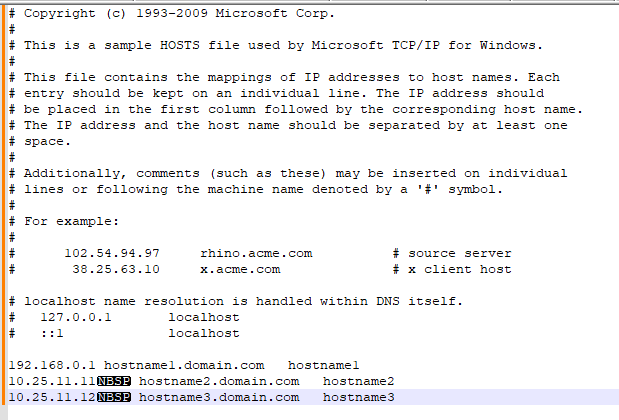
Hosts file shows some non-printing characters such as Non-breaking space (NBSP) characters.
Resolution
Review the Hosts file in Notepad++ with view set to show non-printing characters.
Remove any nonstandard characters.
Once the hosts file is clean, stop NetWorker services.
Rename nsrladb
Verify that the name is populated correctly in nsrla.
(View -> Show Symbol -> Show Non-Printing Characters.)
Remove any nonstandard characters.
Once the hosts file is clean, stop NetWorker services.
Rename nsrladb
- Windows: C:\Program Files\EMC Networker\nsr\res\nsrladb
- Linux: /nsr/res/nsrladb
nsradmin -p nsrexec
nsradmin> p type: nsrla
Affected Products
NetWorkerArticle Properties
Article Number: 000225354
Article Type: Solution
Last Modified: 23 May 2024
Version: 1
Find answers to your questions from other Dell users
Support Services
Check if your device is covered by Support Services.