VxRail: vSphere HA agent cannot be installed or configured fails with the error: Rejected password for user vpxuser
Summary: VxRail: vSphere HA agent cannot be installed or configured.
This article applies to
This article does not apply to
This article is not tied to any specific product.
Not all product versions are identified in this article.
Symptoms
Node is unavailable in vCenter.
Errors in vCenter for ESXi:

hostd.log: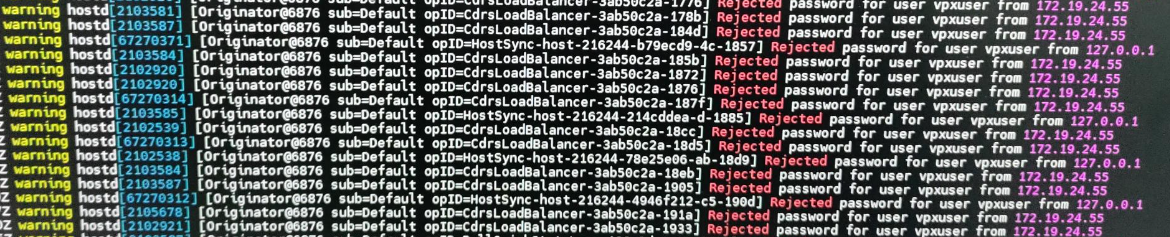
The VMs on the node are still running. The vSAN health by CLI reported all tests green.
Errors in vCenter for ESXi:
Cannot complete login due to an incorrect username or password
vSphere HA agent cannot be installed or configured
Customer had rolled back vCenter due to an issue trying to upgrade some nodes in the cluster. The nodes and VMs are not managed by vCenter anymore.
VXR014030 ALARM Check vSphere HA host status
Vsphere HA host status
Cannot synchronize host …………….
hostd.log:
Rejected password for user vpxuser from XXX.XX.XX.XX (ip address)
The VMs on the node are still running. The vSAN health by CLI reported all tests green.
esxcli vsan health cluster list
Cause
This issue occurs when the cached password for vpxuser is incorrect on the host or your account has expired within vCenter Server.
https://knowledge.broadcom.com/external/article?legacyId=2097171
The vpxuser is a user generated in the ESXi by the vCenter once the node is added and reconnected to vCenter.
https://knowledge.broadcom.com/external/article?legacyId=2097171
The vpxuser is a user generated in the ESXi by the vCenter once the node is added and reconnected to vCenter.
Resolution
To resolve this issue, disconnect and connect the host instead of using the "remove from inventory step" mentioned in the VMware KB above.
Note: In the KB2097171, it includes removing the node from the inventory. Removing the node from vCenter inventory is a more invasive task compared to the disconnect and reconnecting option.
In some situations, the customer may have VMs still running on the node. These VMs may be unable to be migrated or registered on another node because of the unmanaged ESXi status.
When a host is removed from inventory, it is completely removed from vCenter management and vSAN participation. Prior to removing it, all the VMs must be powered off. Once the node is out of vCenter, the VMs must be registered to a new node to power them on. By comparison, when a host is disconnected from the vCenter, it continues participating in the vSAN. All the VMs that are on the node continues running without problems, even if the host is disconnected.
Steps:
Note: In the KB2097171, it includes removing the node from the inventory. Removing the node from vCenter inventory is a more invasive task compared to the disconnect and reconnecting option.
In some situations, the customer may have VMs still running on the node. These VMs may be unable to be migrated or registered on another node because of the unmanaged ESXi status.
When a host is removed from inventory, it is completely removed from vCenter management and vSAN participation. Prior to removing it, all the VMs must be powered off. Once the node is out of vCenter, the VMs must be registered to a new node to power them on. By comparison, when a host is disconnected from the vCenter, it continues participating in the vSAN. All the VMs that are on the node continues running without problems, even if the host is disconnected.
Note: Disconnecting a managed host, temporarily suspends all monitoring activities that vCenter Server performs. The managed host and its associated virtual machines remain in the vCenter Server inventory. https://docs.vmware.com/en/VMware-vSphere/7.0/com.vmware.vsphere.vcenterhost.doc/GUID-DE06875C-CB8C-442E-AC1D-24BFFA3F6705.html
Steps:
- Disconnect the node from vCenter https://docs.vmware.com/en/VMware-vSphere/7.0/com.vmware.vsphere.vcenterhost.doc/GUID-DE06875C-CB8C-442E-AC1D-24BFFA3F6705.html
- Open an SSH session to the affected node:
- Stop the service below: (It is necessary that this service is stopped before the reconnection task is initiated)
/etc/init.d/vpxa stop
- Remove the account:
esxcli system account remove -i vpxuser
- Confirm that the account is not present:
esxcli system account list
- Go back to vCenter UI and connect the host (there will be some errors in the background indicating user and password errors, just continue with the wizard).
- Complete the wizard and the node should be manageable from vCenter again.
Affected Products
VMware ESXi 6.7.X, VMware ESXi 7.x, VMware vCenter ServerArticle Properties
Article Number: 000225410
Article Type: Solution
Last Modified: 28 May 2024
Version: 1
Find answers to your questions from other Dell users
Support Services
Check if your device is covered by Support Services.