Avamar NDMP browsing Isilon shows an incorrect directory structure
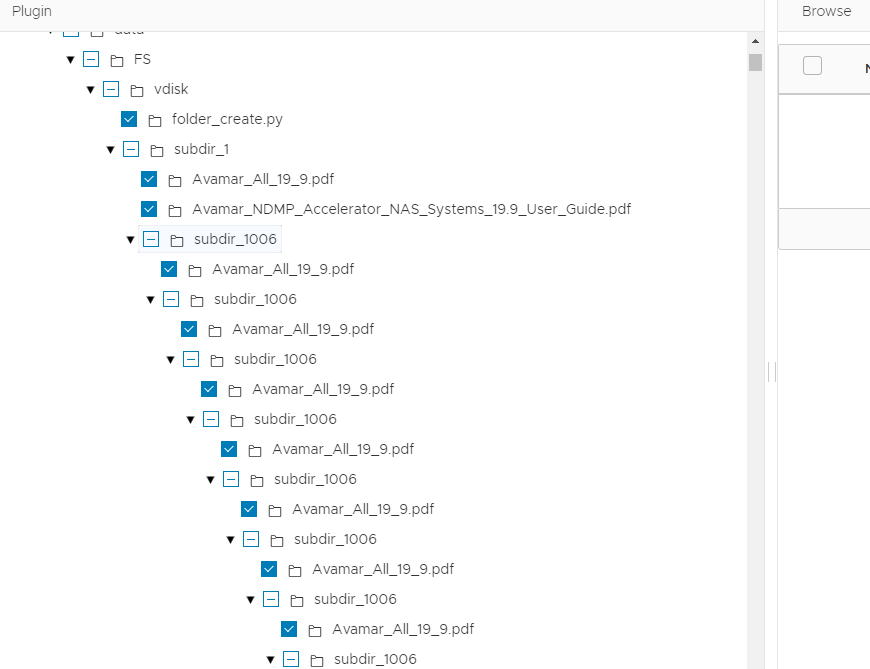
Summary: NDMP browse on Isilon displays directories in a nested loop structure, without any error message.
This article applies to
This article does not apply to
This article is not tied to any specific product.
Not all product versions are identified in this article.
Symptoms
When using Avamar UI to browse the Isilon directory structure, after the user initiates a browse and expands the subfolders, some directories appear in a nested loop structure. However, when checking the same directories using the Isilon web UI or CLI, the subfolders are located at the same level, with no nested loop structure observed.
Cause
When browsing Isilon directories on Avamar, user authentication is required. Isilon supports two authentication methods. The original method is 'basic authentication'.
A new method, 'session-based authentication', was introduced and enabled by default starting with Isilon OneFS 9.2 to enhance security. However, the Avamar NDMP browse method was not updated to accommodate this change, which is why this issue was not observed in earlier versions like OneFS 9.1.
When 'session-based authentication' is enabled and the number of subfolders exceeds 150, it triggers a browse path calculation issue in the ctl_message between the avndmp and avtar processes on the NDMP Accelerator node.
Resolution
This is identified as a issue and will be fixed in future releases.
Workaround
Step 1: On Isilon 9.2 and onward versions, we can enable 'basic authentication' by this command in the Isilon CLI:
isi_gconfig -t web-config auth_basic
Step 2: After 'basic authentication' is enabled, add this flag into /usr/local/avamar/var/<Isilon_node>/avndmp.cmd
--enable-session-based-authentication=false
Note: This workaround would decrease the security, customers must evaluate it before applying it. This is acceptable when both the Isilon and Avamar nodes are used in a private and well-secured environment.
If this is not acceptable for security reasons, customers can also consider the following:
- Avoid creating too many subfolders in the same directory
- Temporarily ignore the looped directories and wait for the new NDMP software release. This issue does not impact general NDMP backup/restore jobs
Additional Information
See AVAMARESC-2114 to read more details about this issue.
Affected Products
Avamar Client, Avamar Plug-in for NDMPArticle Properties
Article Number: 000238275
Article Type: Solution
Last Modified: 28 Oct 2024
Version: 1
Find answers to your questions from other Dell users
Support Services
Check if your device is covered by Support Services.