Data Science Software Application Stops Responding When Installing
Summary: Information about install issues with the Data Science Software (DSS) application in Ubuntu 24.04.
This article applies to
This article does not apply to
This article is not tied to any specific product.
Not all product versions are identified in this article.
Symptoms
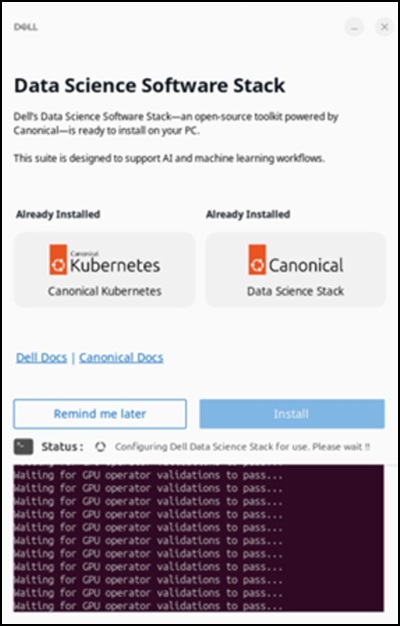
When you install the DSS application, it stops responding on the "Waiting for GPU operator validations to pass…" screen for over 48 hours. This happens after connecting to the Internet and clicking "Install" to set up the Dell Data Science software stack.
Affected Systems:
- Precision 5860 Tower
- Precision 7875 Tower
- Precision 7960 Rack
- Precision 7960 Tower
- Dell Pro Max Micro FCM2250
- Dell Pro Max Slim FCS1250
- Dell Pro Max Tower T2 FCT2250
Affected Operating System:
- Ubuntu 24.04
Cause
Network restrictions within the China region limit access to the Snap Store and prevents a successful download of the DSS application.
Resolution
Using a Virtual Private Network (VPN) is recommended to ensure that the download completes successfully. After connecting to the VPN, click the "Install" option in the DSS application.

Affected Products
Dell Pro Max Micro FCM2250, Dell Pro Max Slim FCS1250, Dell Pro Max Tower T2 FCT2250, Precision 5860 Tower, Precision 7960 Rack, Precision 7875 Tower, Precision 7960 TowerArticle Properties
Article Number: 000453914
Article Type: Solution
Last Modified: 02 Jul 2026
Version: 2
Find answers to your questions from other Dell users
Support Services
Check if your device is covered by Support Services.