VPLEX: Resetting User Password fails with approved length and special characters
Summary: This article talks to what to do if a user is unable to reset a password for a User even though the Password follows all the rules and contains approved special characters.
This article applies to
This article does not apply to
This article is not tied to any specific product.
Not all product versions are identified in this article.
Symptoms
VPLEX: How to reset a user account password in the VPlexcli (A Dell Support account is required to view this article)
- Unable to reset User password with the valid password length and special characters
- Getting below error as:
VPlexcli:/> user reset -u testuser
Enter admin password:
Enter password for testuser:
Confirm password for testuser:
user reset: Evaluation of <<user reset ********>> failed.
cause: Command execution failed.
cause: Password can only contain A-Z a-z 0-9 . ? / * @ ^ % # + = - _ : space character(s),and the password cannot start with space(s).
Cause
- The problem here is not with the password chosen for the User profile, but it is with the admin password.
- The admin password used here to log in to the VPLEX to reset the User Password is not compliant with the guidance mentioned in the VPLEX Security Configuration Guide (SCG)
- The below statement holds for any user account password be it admin or any user,
Password can only contain A-Z a-z 0-9 . ? / * @ ^ % # + = - _ : space character(s),and the password cannot start with space(s).
Resolution
Change the admin password to a new one that adheres to the guide lines per the SCG and then you could proceed with the password reset action, that is, Reset User password.
Reference the SCG and KB articles listed below;
Security Configuration Guide:
https://support.emc.com/docu31419_VPLEX-GeoSynchrony-Security-Configuration-Guide.pdf
If per chance this Guide gets updated and the link above does not work, you can also go to https://www.dell.com/support/home and enter the values for each field as shown below,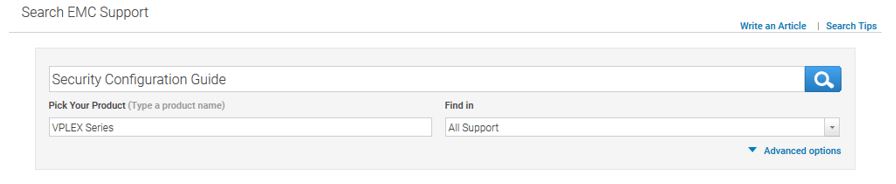
Articles:
- KB 000166110: VPLEX: How to reset the admin password if forgotten, lost, or to change per company policy (A Dell Support account is required to view this article)
- KB 000156259: VPLEX: How to reset a user account password in the VPlexcli (A Dell Support account is required to view this article)
- KB 000160933: VPLEX: Characters approved for use in VPLEX user passwords (A Dell Support account is required to view this article)
Affected Products
VPLEX SeriesProducts
VPLEX for All Flash, VPLEX Series, VPLEX VS2, VPLEX VS6Article Properties
Article Number: 000167720
Article Type: Solution
Last Modified: 12 Nov 2025
Version: 5
Find answers to your questions from other Dell users
Support Services
Check if your device is covered by Support Services.