PowerEdge: High SMART Error Rates for Read and Verify ECC Errors on Certain Enterprise Hard Drives
Summary: High SMART error rates on some Enterprise hard drive are informational and have no bearing on hardware health.
This article applies to
This article does not apply to
This article is not tied to any specific product.
Not all product versions are identified in this article.
Symptoms
Table of Contents
1. Introduction
2. Description
3. Solution
4. Further Information
Introduction
S.M.A.R.T. (Self-Monitoring, Analysis, and Reporting Technology; often written as SMART) is a health monitoring system for hard drives and solid state drives which has been internationally standardized.
SMART's primary function is to detect and report drive reliability indicators, anticipating failures to allow hardware replacement before failure and maintain data integrity.
Dell has collaborated with our hard drive vendors in the interpretation of these values.
Description
Reviewing the SMART status of some enterprise hard drives revealed high read and verifying ECC correction rates on certain models. Comparing these values with other hard drives may suggest that some models have a higher error rate than others, which may report zero ECC corrections.
Sometimes this error rate appears as hundreds of millions of ECC corrections and may increment rapidly as more I/O transactions occur.
An example of this situation is provided below. This example was gathered by running the command "smartctl -a /dev/sdX" under Linux OS.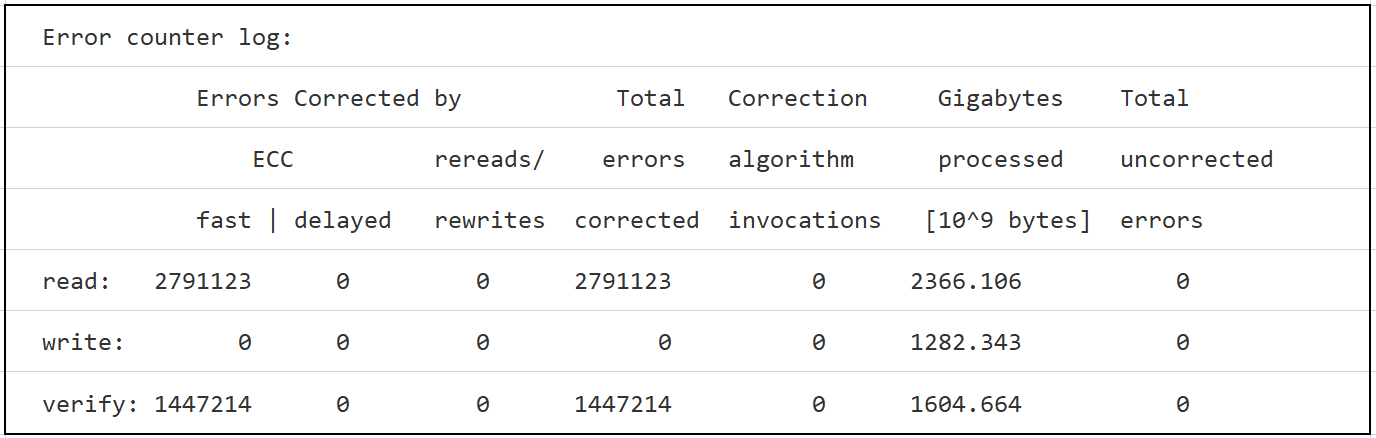
Figure 1: Error Counter Log
Note: The
Smartctl application is a component of Smartmontools, an open-source tool-set for querying the health of hard drives.
Note: SMART logs from enterprise hard drives, interpreted by third-party utilities like
Smartmontools, may not accurately reflect the count of ECC errors for the devices.
Cause
N/A
Resolution
Solution
The SMART specification allows vendors to provide these counters, such as the ones shown in the above example, for informational purposes. The counters are not necessarily a count of soft or hard faults within the ECC logic. This allows each drive vendor flexibility as to what is displayed in the available SMART fields. For some vendors, no error data is in the ECC read or verify categories. In the example above, the vendor has chosen to use the counters for monitoring the ECC functionality. The values which are presented do not represent an error-rate. Similarly, a higher rate of events on some disks in comparison to others does not indicate that a performance problem exists.
Note: SMART parameters should not be compared across a mixed install-base of vendors or models; only similar models and firmware should be compared.
For specific queries about health counters on an Enterprise hard drive model, contact our support technicians to get answers from Dell Technologies' engineering teams.
.
Additional Information
Further Information
- For more information about the international standardization of SMART values and other SCSI Storage Interfaces see the home page of the T10 technical committee located here
.
Smartmontoolsis a utility to control and monitor computer storage systems using the Self-Monitoring, Analysis, and Reporting Technology system built into most modern ATA, Serial ATA, SCSI/SAS and NVMe hard drives. It is not a Dell tool. More information aboutSmartmontoolscan be found here
Affected Products
PowerEdge, C Series, PowerVault, Legacy Storage ModelsArticle Properties
Article Number: 000147878
Article Type: Solution
Last Modified: 12 Jan 2026
Version: 6
Find answers to your questions from other Dell users
Support Services
Check if your device is covered by Support Services.