Avamar - Type plug-in wordt weergegeven als leeg in het AUI-dashboard
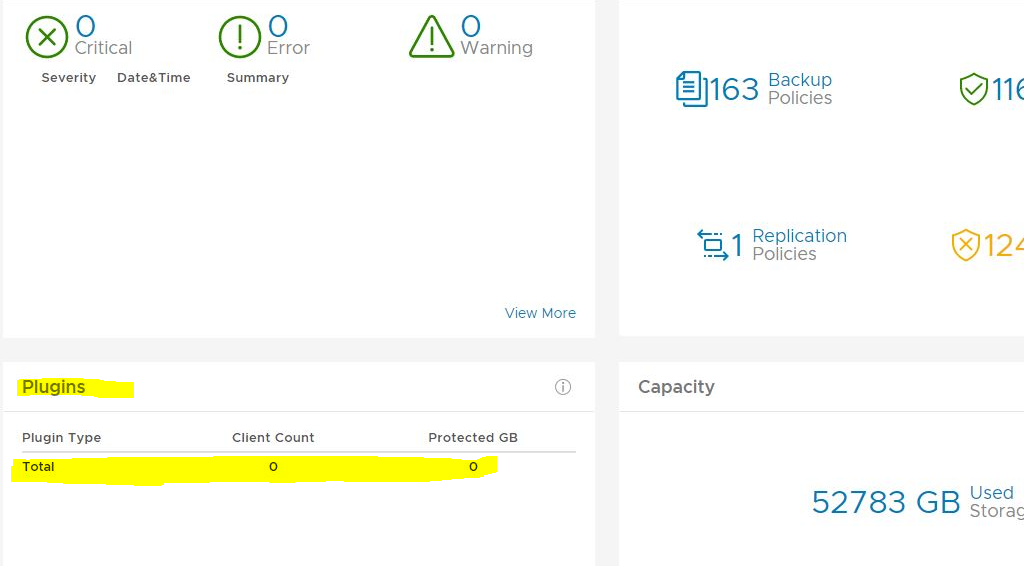
Summary: In het Avamar AUI-dashboard in het scherm Plug-ins is het totale aantal voor de plug-ins nul.
This article applies to
This article does not apply to
This article is not tied to any specific product.
Not all product versions are identified in this article.
Symptoms
In het AUI-dashboard ziet u dat het vak plug-ins leeg is:
Cause
Er is geen vermelding in report_history tabel voor INIT_RPT_ACT_BYTES_PROT_PI rapport-ID. Het 'Dagelijkse schema' voegt dit toe zodra het wordt uitgevoerd.
Resolution
Voer in de Management Console UI (MCGUI) het activiteiten-plugin stats-rapport uit.
Ga in de gebruikersinterface naar --> Tools --> Manage Reports --> Activities-Plugin stats.
Controleer nogmaals de plug-in-details in het AUI-dashboard en deze moet correct zijn. Voorbeeld hieronder.

Ga in de gebruikersinterface naar --> Tools --> Manage Reports --> Activities-Plugin stats.
Controleer nogmaals de plug-in-details in het AUI-dashboard en deze moet correct zijn. Voorbeeld hieronder.
Article Properties
Article Number: 000212094
Article Type: Solution
Last Modified: 29 Jun 2023
Version: 2
Find answers to your questions from other Dell users
Support Services
Check if your device is covered by Support Services.