Avamar – insticksprogramstypen visas som tom i AUI-instrumentpanelen
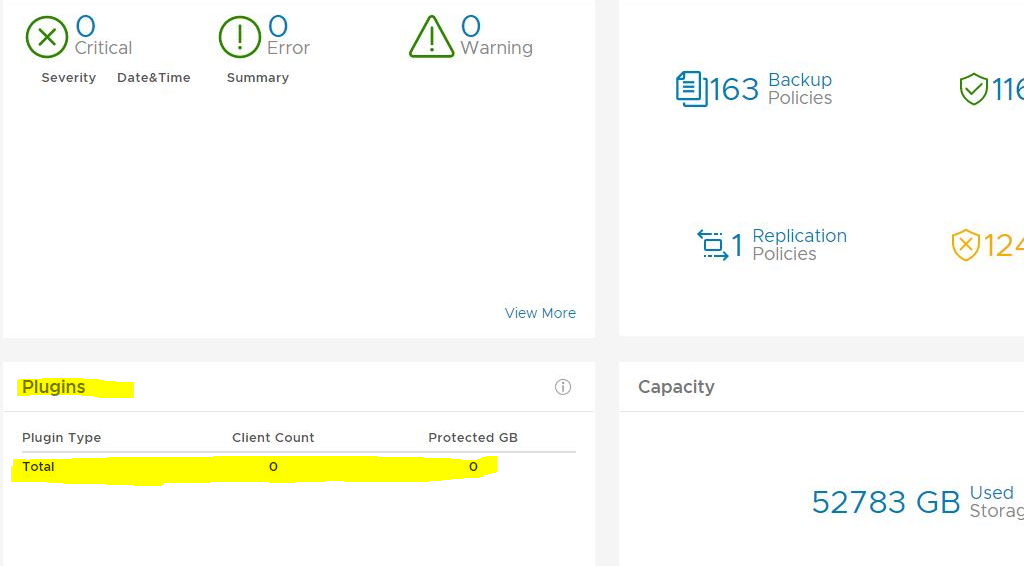
Summary: På skärmen Plugins på Avamar AUI Dashboard är det totala antalet för insticksprogram noll.
This article applies to
This article does not apply to
This article is not tied to any specific product.
Not all product versions are identified in this article.
Symptoms
På AUI Dashboard visas att insticksprogramsrutan är tom:
Cause
Det finns ingen post i report_history-tabellen för rapport-ID för INIT_RPT_ACT_BYTES_PROT_PI. Det här läggs till i det dagliga schemat när det har körts.
Resolution
Kör statistikrapporten
activities-plugin i hanteringskonsolens användargränssnitt (MCGUI).I användargränssnittet går du till --> Tools --> Manage Reports --> Activities-Plugin stats.
Kontrollera insticksprogrammets information igen i AUI-instrumentpanelen. Det bör vara korrekt. Exempel nedan.

activities-plugin i hanteringskonsolens användargränssnitt (MCGUI).I användargränssnittet går du till --> Tools --> Manage Reports --> Activities-Plugin stats.
Kontrollera insticksprogrammets information igen i AUI-instrumentpanelen. Det bör vara korrekt. Exempel nedan.
Article Properties
Article Number: 000212094
Article Type: Solution
Last Modified: 29 Jun 2023
Version: 2
Find answers to your questions from other Dell users
Support Services
Check if your device is covered by Support Services.