Avamar – Plugin-typen vises som tom i AUI-instrumentpanelet
Summary: I Avamar AUI-instrumentpanelet, på Plugins-skjermen, er det totale antallet plugin-moduler null.
This article applies to
This article does not apply to
This article is not tied to any specific product.
Not all product versions are identified in this article.
Symptoms
Instrumentpanelet i AUI viser at plugin-boksen er tom:

Cause
Det er ingen oppføring i report_history tabellen for INIT_RPT_ACT_BYTES_PROT_PI rapport-ID. Den daglige tidsplanen legger til dette når den kjøres.
Resolution
Kjør rapporten Aktiviteter-plugin-statistikk i brukergrensesnittet for administrasjonskonsollen (MCGUI).
I brukergrensesnittet går du til --> Tools --> Manage Reports --> Activities-Plugin stats (Aktiviteter – Plugin-statistikk).
Kontroller plugin-detaljene i AUI-kontrollpanelet på nytt, og den skal være riktig. Eksempel nedenfor.
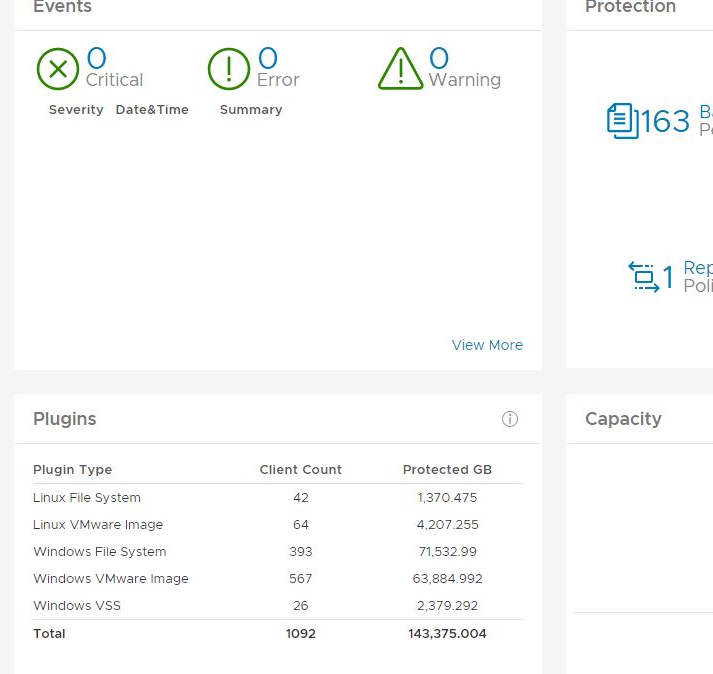
I brukergrensesnittet går du til --> Tools --> Manage Reports --> Activities-Plugin stats (Aktiviteter – Plugin-statistikk).
Kontroller plugin-detaljene i AUI-kontrollpanelet på nytt, og den skal være riktig. Eksempel nedenfor.
Article Properties
Article Number: 000212094
Article Type: Solution
Last Modified: 29 Jun 2023
Version: 2
Find answers to your questions from other Dell users
Support Services
Check if your device is covered by Support Services.