Avamar — typ wtyczki jest wyświetlany jako pusty na pulpicie nawigacyjnym AUI
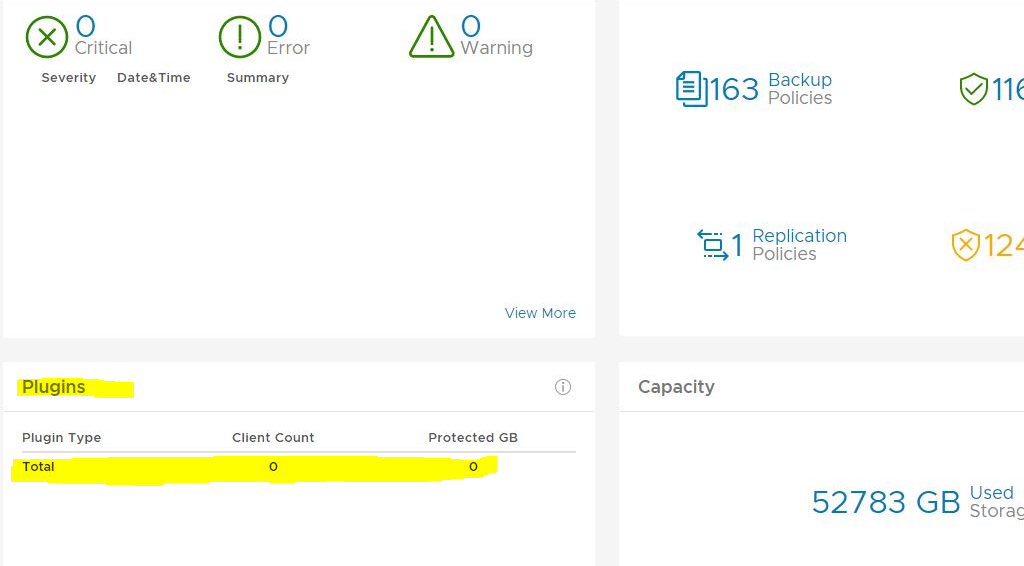
Summary: Na pulpicie nawigacyjnym Avamar AUI na ekranie wtyczek łączna liczba wtyczek wynosi zero.
This article applies to
This article does not apply to
This article is not tied to any specific product.
Not all product versions are identified in this article.
Symptoms
Pulpit nawigacyjny AUI pokazuje, że pole wtyczki jest puste:
Cause
Nie ma wpisu w tabeli report_history dla identyfikatora raportu INIT_RPT_ACT_BYTES_PROT_PI. Po uruchomieniu zostanie dodany harmonogram codziennego harmonogramu.
Resolution
W interfejsie użytkownika konsoli zarządzania (CRUUI) uruchom raport statystyk wtyczek działań .
W interfejsie użytkownika przejdź do opcji --> Tools --> Manage Reports --> Activities-Plugin stats.
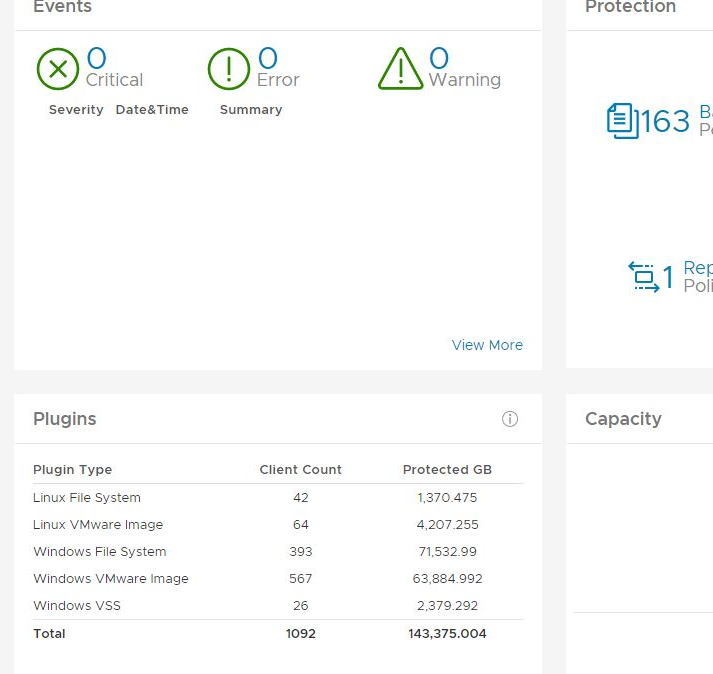
Sprawdź ponownie szczegóły wtyczki na pulpicie nawigacyjnym AUI i powinno być prawidłowe. Przykład poniżej.
W interfejsie użytkownika przejdź do opcji --> Tools --> Manage Reports --> Activities-Plugin stats.
Sprawdź ponownie szczegóły wtyczki na pulpicie nawigacyjnym AUI i powinno być prawidłowe. Przykład poniżej.
Article Properties
Article Number: 000212094
Article Type: Solution
Last Modified: 29 Jun 2023
Version: 2
Find answers to your questions from other Dell users
Support Services
Check if your device is covered by Support Services.