IDPA: PPDP Health Check Tool fails with error: There are unsupported Virtual Machine(s) [AvProxy] in powered on state.
Summary: Preupgrade, the PPDP Health Check Tool is run to check upgrade readiness. If the internal Avamar Proxy is incorrectly named, it can cause this check to fail. If the failure is caused by any other named virtual machine being found, do not follow this KB. ...
This article applies to
This article does not apply to
This article is not tied to any specific product.
Not all product versions are identified in this article.
Symptoms
Error message:
There are unsupported Virtual Machine(s) [AvProxy] in powered on state.


Cause
A previous procedure to manually redeploy the internal Avamar Proxy included instructions to name the Virtual Machine AvProxy (lowercase "v"). This causes the non_idpa_vm check to fail.
Log in to the vSphere web UI and see that the AvProxy is named incorrectly: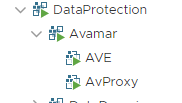
Resolution
-
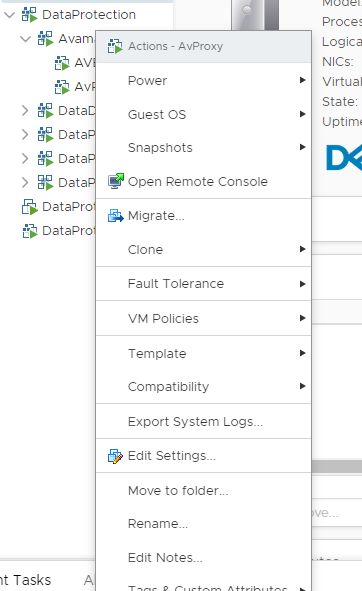
In the vSphere web UI, right-click the AvProxy VM and select "Rename…"
-
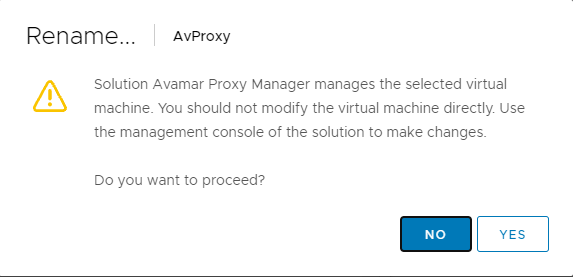
You may see that a display appears to warn about changing this VM as it is part of the Avamar vApp:
-
Select "YES."
-
Rename VM from "AvProxy" (lowercase v) to "AVProxy" (uppercase V). The first three letters of the name are all uppercase "AVP."
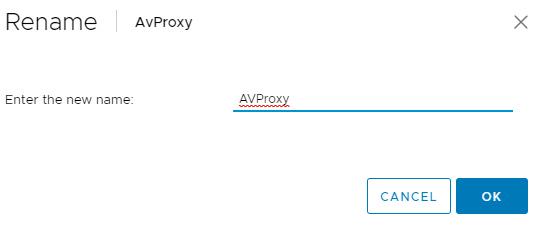
Virtual Machine is renamed. The health Check tool should run without this error.
Affected Products
PowerProtect Data Protection Software, Integrated Data Protection Appliance Family, Integrated Data Protection Appliance SoftwareArticle Properties
Article Number: 000192486
Article Type: Solution
Last Modified: 04 Aug 2025
Version: 3
Find answers to your questions from other Dell users
Support Services
Check if your device is covered by Support Services.