PowerProtect Backup Services: Group Metadata backup failed
Summary: Group Metadata backup of Microsoft 365 Group failed.
This article applies to
This article does not apply to
This article is not tied to any specific product.
Not all product versions are identified in this article.
Symptoms
Group Metadata backup of Microsoft 365 Group failed while the Group Site backup for the same group is fine. 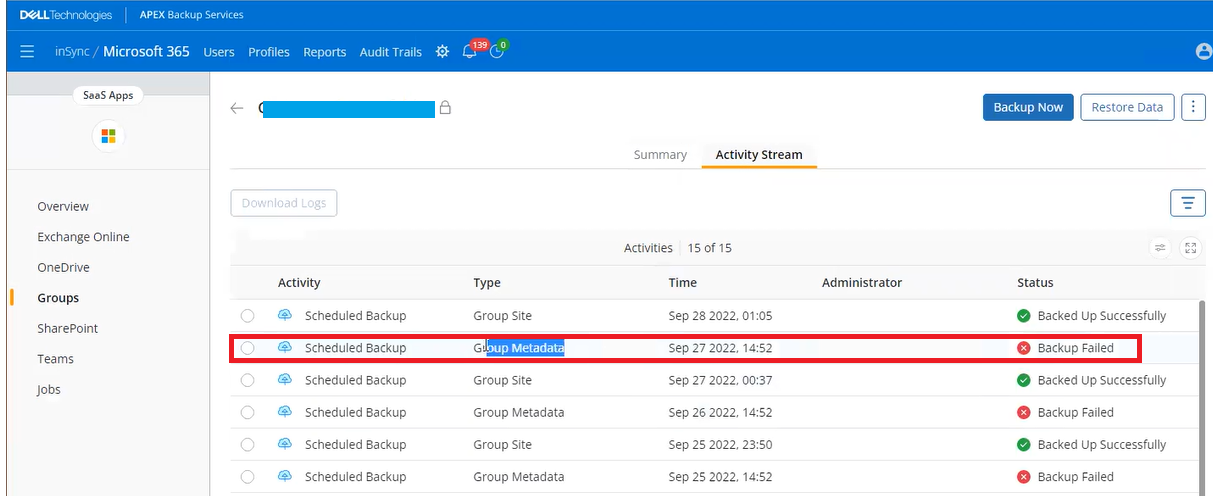
Below errors can be found in the log.
[2022-09-27 06:07:55,535] [ERROR] Failed to list config for group : 9c26fb19-8a3e-43f6-9bec-9ec93e178270, fault Internal Error!! Response Code: 403 Text:{"error":{"code":"ErrorAccessDenied","message":"Access to OData is disabled.","innerError":{"date":"2022-09-27T06:07:55","request-id":"b328997b-be63-43c4-87b6-392896f22533","client-request-id":"b328997b-be63-43c4-87b6-392896f22533"}}} (#100000004)
[2022-09-27 06:07:55,535] [ERROR] Group backup sync failure , fault Internal Error!! Response Code: 403 Text:{"error":{"code":"ErrorAccessDenied","message":"Access to OData is disabled.","innerError":{"date":"2022-09-27T06:07:55","request-id":"b328997b-be63-43c4-87b6-392896f22533","client-request-id":"b328997b-be63-43c4-87b6-392896f22533"}}} (#100000004)
Cause
The issue is with Application Permissions within OAuth for Microsoft 365.
To get the list of Applications run the below command in exchange online PowerShell.
To get the list of Applications run the below command in exchange online PowerShell.
Get-OrganizationConfig | Format-List EwsApplicationAccessPolicy,Ews*List
Resolution
Run the below command in exchange online PowerShell to add python-request to the AllowList.
Set-OrganizationConfig -EwsApplicationAccessPolicy EnforceAllowList -EwsAllowList @{Add="python-requests/*"}
Affected Products
PowerProtect Backup ServicesArticle Properties
Article Number: 000205203
Article Type: Solution
Last Modified: 16 Sep 2025
Version: 2
Find answers to your questions from other Dell users
Support Services
Check if your device is covered by Support Services.