NetWorker:创建新客户端未完成,并显示消息“is not a valid hostname as it cannot be resolved in DNS”(不是有效的主机名,因为它无法在 DNS 中解析)
Summary: 通过 NetWorker 19.7.0.3 中的新客户端属性添加客户端未完成,并报告错误“Name is not a valid hostname as cannot be resolved in DNS. 请将其添加到 DNS 或主机文件,并刷新 NetWorker 服务器的 DNS 缓存 (dbgcommand -p FlushDnsCache)。”
This article applies to
This article does not apply to
This article is not tied to any specific product.
Not all product versions are identified in this article.
Symptoms
通过 NetWorker 19.7.0.3 中 的新客户端属性 添加客户端未完成,并显示以下错误:
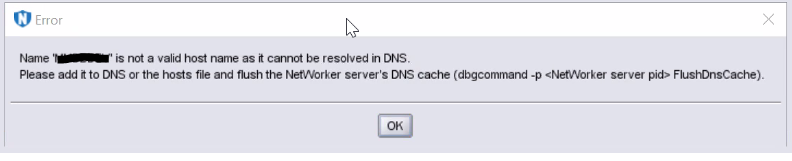
图 1:错误消息的屏幕截图
Name  is not a valid host name as it cannot be resolved in DNS.
Please add it to DNS or the hosts file and flush the NetWorker server's DNS cache (dbgcommand -p  FlushDnsCache).
图 1:错误消息的屏幕截图
Cause
主机名通过 DNS 或通过“hosts”文件无法解析名称。
即使主机名已解析,如果之前出现此错误消息,NetWorker DNS 缓存也会阻止添加客户端。
Resolution
将客户端主机名添加到 DNS(正向和反向条目),或使用以下格式将其添加到“hosts”文件:
IP Address [space/tab] FQDN [space/tab] Short Name
按照以下步骤“刷新”NetWorker DNS 缓存:
- 使用以下命令获取“nsrd”和“nsrexecd”进程的 PID:
Windows:
tasklist | findstr nsrd.exe
tasklist | findstr nsrexecd.exe
Linux:
ps -e | grep nsrd
ps -e | grep nsrexecd
- 针对“nsrd”和“nsrexecd”的 PID 运行以下命令,并使用如下所示的交换机:
dbgcommand -p FlushDnsCache
Article Properties
Article Number: 000212659
Article Type: Solution
Last Modified: 29 Jun 2023
Version: 3
Find answers to your questions from other Dell users
Support Services
Check if your device is covered by Support Services.