NetWorker: NMC fails to launch after upgrade "IM003: Specified driver could not be loaded"
Summary: The NetWorker Management Console (NMC) server service (GSTD) fails to start successfully with this error, IM003: Specified driver could not be loaded due to system error 126: The specified module could not be found. (PostgreSQL ANSI(x64), C:\program files\emc networker\management\GST\postgres_latest\odbc\psqlodbc30a Internal error: could not release database handle ...
This article applies to
This article does not apply to
This article is not tied to any specific product.
Not all product versions are identified in this article.
Symptoms
- The NetWorker Management Console (NMC) package was upgraded on a Windows system.
- The NMC GSTD service fails to start with the following errors logged in the ..\Program Files\EMC NetWorker\Management\GST\logs\gstd.raw:
IM003: Specified driver could not be loaded due to system error 126: The specified module could not be found. (PostgreSQL ANSI(x64), C:\program files\emc networker\management\GST\postgres_latest\odbc\psqlodbc30a
Internal error: could not release database handle
Cause
During the upgrade the postgres folder and postgres_latest symbolic link are removed and then new ones that are created, in this case postgres_latest was successfully re-created but was removed shortly afterwards without any indication of why it happened.
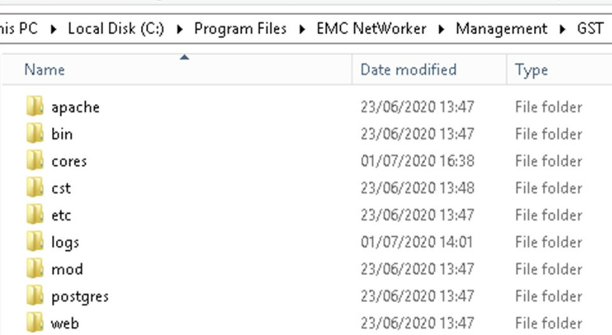
The cause is unknown but occurs during upgrade, the postgres_latest Symbolic Link is removed shortly after it has been created. If the NMC software is removed and then the new software is installed, the symptoms of this issue do not seem to be present.
Resolution
The following steps carried out individually have each been found to fix this issue.
- Uninstall the NMC software and then reinstall.
- Re-create the postgres latest symbolic Link
- Locate the newest postgres folder under (<Install_Directory>:\Program Files\EMC NetWorker\Management\GST\postgres)
- Open am administrative command prompt and run the following command:
mklink /D "path_to_new_symbolic_link "path_to_latest_postgres_folder"
For Example:
mklink /D "C:\Program Files\EMC NetWorker\Management\GST\postgres_latest" "C:\Program Files\EMC NetWorker\Management\GST\postgres\11.1"
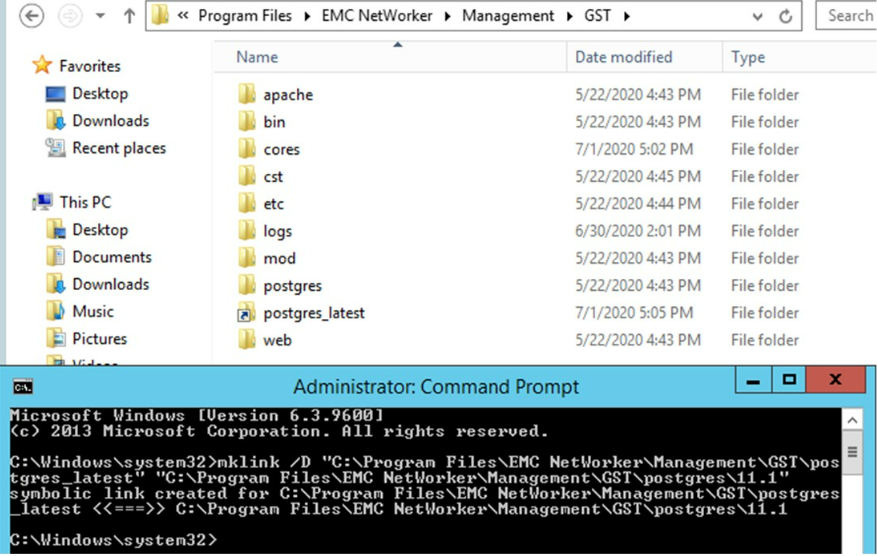
NOTE: Performing an uninstall and reinstall of NetWorker may resolve the issue, but has failed in some instances.
- Once postgres_latest is in place ensure that the NMC launches, and most importantly that the nmcdb backup runs and succeeds.
Affected Products
NetWorkerProducts
NetWorker, NetWorker Management ConsoleArticle Properties
Article Number: 000069897
Article Type: Solution
Last Modified: 08 Aug 2025
Version: 4
Find answers to your questions from other Dell users
Support Services
Check if your device is covered by Support Services.