PowerProtect backup and replication jogs taking a long time to complete
Summary: The PowerProtect Data Manager appliance is used to protect the vSphere environment with the Transparent Snapshot Data Mover (TSDM) solution. The backup and replication for a specific Windows virtual machine (VM) is taking a significant amount of time during every execution. ...
This article applies to
This article does not apply to
This article is not tied to any specific product.
Not all product versions are identified in this article.
Symptoms
The backup workflow log shows a high value for the UsedBtyes and ChangedBytes for the VM:
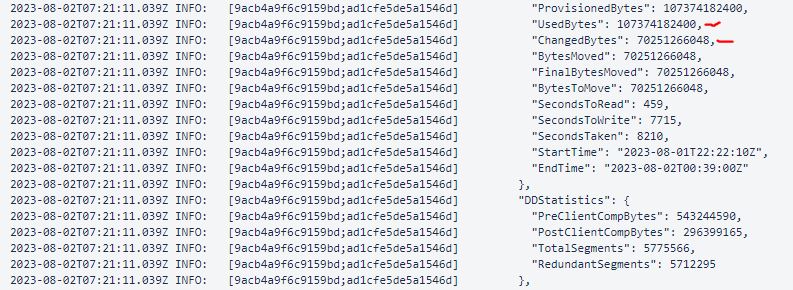
The example shows the ChangedBytes value of 70251266048 bytes (70.3 GB). The VM evaluation shows that the VM is not very active every day and should not have such a high UsedBtyes and ChangedBytes value.
Cause
The cause is the Guest OS Unmap setting on the VM. The Unmap setting is a feature that allows an application or operating system to reclaim space on a storage array. This is done by informing the array that disk blocks contain deleted data, which allows the array to deallocate those blocks.
Resolution
Disable the Unmap setting on the Guest OS or use the File System Agent to protect the file system.
- To verify the current
Unmapsetting:fsutil behavior query DisableDeleteNotify
DisableDeleteNotify=0 - indicates the Trim and Unmap feature is on (enabled)
DisableDeleteNotify=1 - indicates the Trim and Unmap feature is off (disabled)- To disable the
Unmapsetting:fsutil behavior set DisableDeleteNotify 1
Additional Information

Affected Products
Data Protection, PowerProtect Data ManagerArticle Properties
Article Number: 000217326
Article Type: Solution
Last Modified: 05 Feb 2025
Version: 1
Find answers to your questions from other Dell users
Support Services
Check if your device is covered by Support Services.