VxRail: How to check for Stretch Cluster in VxRail
Summary: How to check if the Stretch Cluster feature is enabled in VxRail.
This article applies to
This article does not apply to
This article is not tied to any specific product.
Not all product versions are identified in this article.
Instructions
In code 7.0.x/8.0.x
- Open vSphere and login with the administrator account.
- Select the VxRail Cluster name in the inventory.
- Click Configure > Fault Domains
- Verify the Configuration type. If it says Single site, then it is not a stretched cluster.

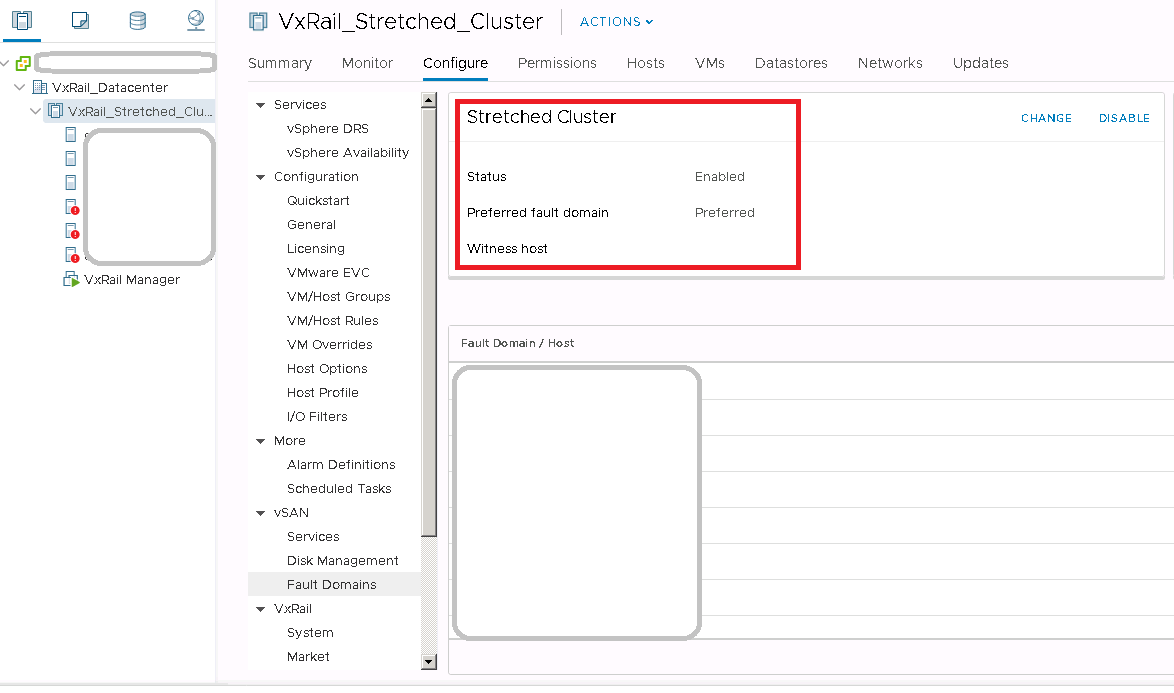
In code 4.7.x
- Open vCenter web client, and log in with an administrator account
- Select the VxRail Cluster name in the inventory.
- Click Configure -> vSAN-> Fault Domains
- Verify the status of the Stretched cluster. If the status is Enabled, then it means that Stretched cluster is in use.
Affected Products
VxRail, VxRail Appliance Series, VxRail SoftwareArticle Properties
Article Number: 000013864
Article Type: How To
Last Modified: 03 Mar 2025
Version: 5
Find answers to your questions from other Dell users
Support Services
Check if your device is covered by Support Services.