No Disconnect Option in Bluetooth Settings After Connecting Monitor Using Wireless Display
Summary: This article provides information about wireless display (WIDI) missing the Disconnect button.
This article applies to
This article does not apply to
This article is not tied to any specific product.
Not all product versions are identified in this article.
Symptoms
Affected Platforms:
- Dell 14 Plus DB14250
- Dell 14 Plus 2-in-1 DB04250
- Dell 16 Plus DB16250
- Dell 16 Plus 2-in-1 DB06250
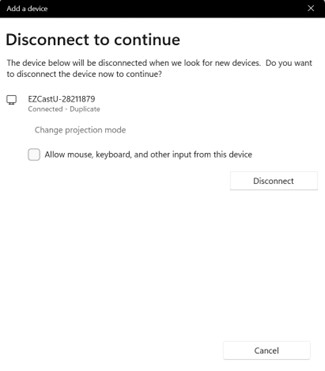
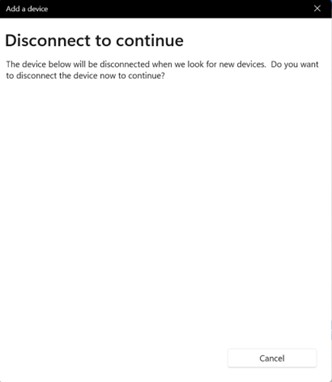
When connecting to a Wireless display using Bluetooth, there is no Disconnect option available for WIDI under Add a Bluetooth Devices setting.
Expected behavior:
Show the connected device and there is a Disconnect button.
Issue:
The Add a Device screen does not show any connected devices and there is no disconnect button.
Cause
This is a Windows UI issue in 24H2, missing the wireless display Disconnect button.
Resolution
Microsoft will release a Hotfix to resolve this issue.
Workaround:
- Win + P set computer screen only to disconnect.
- Click Disconnect in Bluetooth & Devices settings.
Affected Products
Dell 14 Plus 2-in-1 DB04250, Dell 16 Plus 2-in-1 DB06250, Dell 14 Plus DB14250, Dell 16 Plus DB16250Article Properties
Article Number: 000286293
Article Type: Solution
Last Modified: 22 Apr 2025
Version: 2
Find answers to your questions from other Dell users
Support Services
Check if your device is covered by Support Services.