PowerScale: Understanding NFSv4 nondefault settings
Summary: Understanding NFSv4 nondefault settings.
This article applies to
This article does not apply to
This article is not tied to any specific product.
Not all product versions are identified in this article.
Instructions
Sometimes, the default NFSv4 setup produces unexpected results. The following issues can occur and be adjusted as indicated. Best practice recommends avoiding non-default settings because they often break NFSv4 access control list (ACL) support.
- NFSv4 domain not configured: Root ownership appears as
nobody:nobody, while non-root users display correctuser:groupcontext. Without domain information, ACL support on the mount is unlikely. -
NFSv4 domain is configured: Root ownership appears as
root:wheelinstead ofroot:root. If root access is critical, set a root GID in the Isilon zone or on Linux clients. This option is most relevant for environments using multiple NFSv4 zones. Editing the System zone is not recommended.
Why root shows as root:wheel: NFSv4 returns UID and GID names from the server. In OneFS, 0:0 maps to root:wheel. Linux systems may lack the wheel group or assign it GID 10. A workaround entails using a local provider file for the NFSv4 zone, but modifying the System zone is discouraged.
Another option is editing client files as described in the KB: NFSv4 export with no_root_squash enabled uses group wheel on Linux client instead of group root. This method adds root to the wheel group in /etc/group.
-
NFSv4 No Names set to non-default YES: This setting sends UIDs/GIDs instead of
user@domain. Root ownership appears asroot:root, but ACL support fails because the protocol requiresuser@domainsyntax per RFC.
Technical details for NFS zone settings are available in context-sensitive help.
CLUSTER# isi nfs settings zone modify -h
Description:
    Change the default NFS zone options.
Required Privileges:
    ISI_PRIV_NFS
Usage:
    isi nfs settings zone modify
        [--nfsv4-domain <string>]
        [--revert-nfsv4-domain]
        [--nfsv4-replace-domain <boolean>]
        [--revert-nfsv4-replace-domain]
        [--nfsv4-no-domain <boolean>]
        [--revert-nfsv4-no-domain]
        [--nfsv4-no-domain-uids <boolean>]
        [--revert-nfsv4-no-domain-uids]
        [--nfsv4-no-names <boolean>]
        [--revert-nfsv4-no-names]
        [--nfsv4-allow-numeric-ids <boolean>]
        [--revert-nfsv4-allow-numeric-ids]
        [--zone <string>]
        [{--verbose | -v}]
        [{--help | -h}]
Options:
    --nfsv4-domain <string>
        NFSv4 domain name.
    --revert-nfsv4-domain
        Set value to system default for --nfsv4-domain.
    --nfsv4-replace-domain <boolean>
        Replace owner/group domain with nfs domainname. (v4).
    --revert-nfsv4-replace-domain
        Set value to system default for --nfsv4-replace-domain.
    --nfsv4-no-domain <boolean>
        Send owners/groups without domainname (v4).

    --revert-nfsv4-no-domain
        Set value to system default for --nfsv4-no-domain.
    --nfsv4-no-domain-uids <boolean>
        Send UIDs/GIDs without domainname (v4).
    --revert-nfsv4-no-domain-uids
        Set value to system default for --nfsv4-no-domain-uids.
    --nfsv4-no-names <boolean>
        Always send owners/groups as UIDs/GIDs (v4).
    --revert-nfsv4-no-names
        Set value to system default for --nfsv4-no-names.
    --nfsv4-allow-numeric-ids <boolean>
        Send owners/groups as UIDs/GIDs when lookups fail or if no_names=1 (v4).
    --revert-nfsv4-allow-numeric-ids
        Set value to system default for --nfsv4-allow-numeric-ids.
    --zone <string>
        Access zone.
  Display Options:
    --verbose | -v
        Display more detailed information.
    --help | -h
        Display help for this command.
Defaults from command line interface:
CLUSTER# isi nfs settings zone view
           NFSv4 Domain: localhost
   NFSv4 Replace Domain: Yes
        NFSv4 No Domain: No
   NFSv4 No Domain UIDs: Yes
         NFSv4 No Names: No
NFSv4 Allow Numeric IDs: Yes
Defaults from WebUI: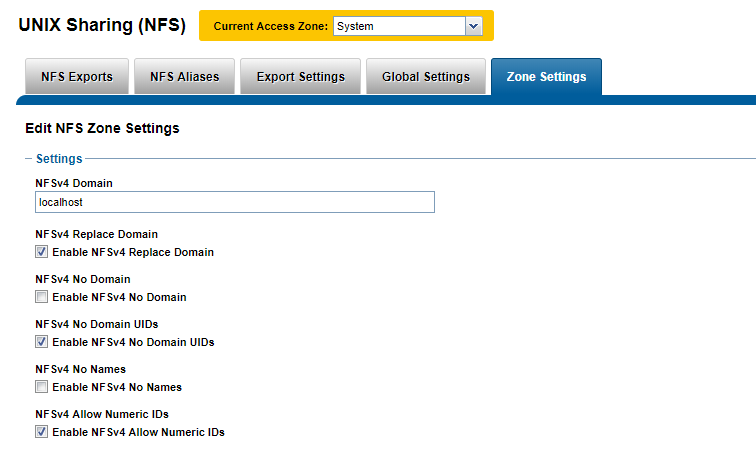
Additional Information
Affected Products
IsilonProducts
IsilonArticle Properties
Article Number: 000023023
Article Type: How To
Last Modified: 27 Nov 2025
Version: 4
Find answers to your questions from other Dell users
Support Services
Check if your device is covered by Support Services.