Dell EMC Unity : Pool size is showing over subscription (Customer Correctable)
Summary: Impact - Customer may be seeing over subscription on Unity pool status when Snaps / Async replication in place.
This article applies to
This article does not apply to
This article is not tied to any specific product.
Not all product versions are identified in this article.
Symptoms
Snaps and Replication features have been added to the Dell EMC Unity platform in which the array will report the increased subscription.
Customer may be seeing Unisphere reporting over subscription on Pool status - this is not an alert warning or Error of any kind .
(Lab example - open in new tab for better visibility)
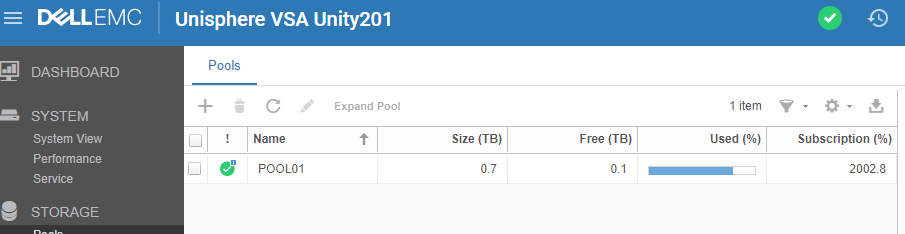
The problem is also evident from UEMCLI:
19:24:33 service@-spa spa:~> uemcli /stor/config/pool show -detail
Storage system address: 127.0.0.1
Storage system port: 443
HTTPS connection
1: ID = pool_1
Name = POOL01
Description =
Total space = 812822560768 (757.0G)
Current allocation = 645855707136 (601.5G)
Remaining space = 166966853632 (155.5G)
Subscription = 16279428784128 (14.8T)
Subscription percent = 2002%
Alert threshold = 70%
Drives = 1 x 250.0G Virtual; 1 x 256.0G Virtual; 1 x 256.0G Virtual
Number of drives = 3
RAID level =
Stripe length =
Rebalancing = no
Rebalancing progress =
Health state = OK_BUT (7)
Health details = "This storage pool has exceeded the capacity threshold you specified. To allocate more storage space, add additional disks to your system. (https://xxx.xxx.xxx.xxx/help/webhelp/en_US/index.html?#unity_c_storage_pool_at_or_near_full_capacity.html)"
Protection size used = 720896 (704.0K)
Non-base size used = 720896 (704.0K)
Auto-delete state = Idle
Auto-delete paused = no
Auto-delete pool full threshold enabled = yes
Auto-delete pool full high water mark = 95%
Auto-delete pool full low water mark = 85%
Auto-delete snapshot space used threshold enabled = no
Auto-delete snapshot space used high water mark = 25%
Auto-delete snapshot space used low water mark = 20%
Compression space saved = 0
Compression Percent = 0%
Compression Ratio = 1:1
All flash pool = no
Customer may be seeing Unisphere reporting over subscription on Pool status - this is not an alert warning or Error of any kind .
(Lab example - open in new tab for better visibility)
The problem is also evident from UEMCLI:
19:24:33 service@-spa spa:~> uemcli /stor/config/pool show -detail
Storage system address: 127.0.0.1
Storage system port: 443
HTTPS connection
1: ID = pool_1
Name = POOL01
Description =
Total space = 812822560768 (757.0G)
Current allocation = 645855707136 (601.5G)
Remaining space = 166966853632 (155.5G)
Subscription = 16279428784128 (14.8T)
Subscription percent = 2002%
Alert threshold = 70%
Drives = 1 x 250.0G Virtual; 1 x 256.0G Virtual; 1 x 256.0G Virtual
Number of drives = 3
RAID level =
Stripe length =
Rebalancing = no
Rebalancing progress =
Health state = OK_BUT (7)
Health details = "This storage pool has exceeded the capacity threshold you specified. To allocate more storage space, add additional disks to your system. (https://xxx.xxx.xxx.xxx/help/webhelp/en_US/index.html?#unity_c_storage_pool_at_or_near_full_capacity.html)"
Protection size used = 720896 (704.0K)
Non-base size used = 720896 (704.0K)
Auto-delete state = Idle
Auto-delete paused = no
Auto-delete pool full threshold enabled = yes
Auto-delete pool full high water mark = 95%
Auto-delete pool full low water mark = 85%
Auto-delete snapshot space used threshold enabled = no
Auto-delete snapshot space used high water mark = 25%
Auto-delete snapshot space used low water mark = 20%
Compression space saved = 0
Compression Percent = 0%
Compression Ratio = 1:1
All flash pool = no
Cause
With Snap usage , user or system (as in NDMP or Replication or similar) , the subscription usage is expected to increase. This is a normal system behavior.
The reason for this increase is as follows:
Since every snapshot is a point-in-time-copy of the source file system, every snap will subscribe an equal amount of space as the source FS.
Note that, subscribing doesn't imply that the space from the pool is allocated.
Resolution
No actions are required regarding over subscription.
Pending on Pool Issue, Pool Utilization status would be a better indicator of the Pool's health and no" the subscription status, especially when troubleshooting pool issues.
If client however wants to manage the overall subscription values, the following recommendations are made:
1. Create less snaps per storage resource (FS or LUN).
2. RPO for replication can increase (longer intervals between copies), less snaps are taken and possibly left in transitional state (as in destroying or pending).
3. Any non-scheduled snaps (manuals) should be removed when not in use.
Additional Information
Additional related Knowledge base information:
The snapshot retention policy generally aims to reduce the likelihood that an oversubscribed pool becomes entirely full as the result of snapshots, this condition can ... not subject to automatic deletion on the basis of the pool or snapshot space thresholds, it is possible that an over- provisioned pool can become ...
July 27, 2017 | Approved | Level 30 = Customers | 502122 | Dell EMC Unity All Flash,Dell EMC Unity Family,Dell EMC Unity Hybrid,Dell EMC Unity 300,Dell EMC Unity 400...More ... Change pool properties. Procedure 1. Under Storage, select Pools. 2. Select the relevant pool, and then select the Edit icon. ...The subscribed space used is the percentage of the pool's total space that has been requested by its associated storage resources. When this value is over 100%, the pool is oversubscribed. ...
December 20, 2016 | Approved | Level 30 = Customers | 493544 | Dell EMC Unity Family ... storage resources under the pool (ex: LUNS, FileSystems, Snaps ....) To Check the subscription percentage from GUI: Click on Pools under Storage, Then double click on the Pool you want ... see the break down of this percentage in details Run the following commands: - Open SSH connection to the Unity , then use ...
November 22, 2016 | Approved | Level 30 = Customers | 491974 | Dell EMC Unity Family
------------------------------------------------------------------------------------------------------------------------
From Service perspective , use svc_storagecheck -list to generate a list of storage components , focusing on the following fields per pool configured & in question:
(divide value by 2 and /1024 /1024 for value in GB)
TotalSpaceInTier (Sectors) : 1587544064
UsableSize (Sectors) : 1587544064
Domain Free Space : 0
Subscribed Space (Sectors) : 31816730864
Consumed Space (Sectors) : 1261436928
FSL Consumed Space (Sectors) : 0
FSL Subscribed Space (Sectors) : 0
Primary Subscribed (Sectors) : 5064622080
Primary Data Consumption (Sectors) : 1162345088
Secondary Subscribed (Sectors) : 25885460720 ==> ~12TB is subscribed for Snap operations.
Secondary Data Consumption (Sectors): 1408 ==> snapshot utilization is minimal.
Meta Data Subscribed (Sectors) : 845676544
Meta Data Consumption (Sectors) : 99090432
July 27, 2017 | Approved | Level 30 = Customers | 502122 | Dell EMC Unity All Flash,Dell EMC Unity Family,Dell EMC Unity Hybrid,Dell EMC Unity 300,Dell EMC Unity 400...More ... Change pool properties. Procedure 1. Under Storage, select Pools. 2. Select the relevant pool, and then select the Edit icon. ...The subscribed space used is the percentage of the pool's total space that has been requested by its associated storage resources. When this value is over 100%, the pool is oversubscribed. ...
December 20, 2016 | Approved | Level 30 = Customers | 493544 | Dell EMC Unity Family ... storage resources under the pool (ex: LUNS, FileSystems, Snaps ....) To Check the subscription percentage from GUI: Click on Pools under Storage, Then double click on the Pool you want ... see the break down of this percentage in details Run the following commands: - Open SSH connection to the Unity , then use ...
November 22, 2016 | Approved | Level 30 = Customers | 491974 | Dell EMC Unity Family
------------------------------------------------------------------------------------------------------------------------
From Service perspective , use svc_storagecheck -list to generate a list of storage components , focusing on the following fields per pool configured & in question:
(divide value by 2 and /1024 /1024 for value in GB)
TotalSpaceInTier (Sectors) : 1587544064
UsableSize (Sectors) : 1587544064
Domain Free Space : 0
Subscribed Space (Sectors) : 31816730864
Consumed Space (Sectors) : 1261436928
FSL Consumed Space (Sectors) : 0
FSL Subscribed Space (Sectors) : 0
Primary Subscribed (Sectors) : 5064622080
Primary Data Consumption (Sectors) : 1162345088
Secondary Subscribed (Sectors) : 25885460720 ==> ~12TB is subscribed for Snap operations.
Secondary Data Consumption (Sectors): 1408 ==> snapshot utilization is minimal.
Meta Data Subscribed (Sectors) : 845676544
Meta Data Consumption (Sectors) : 99090432
Affected Products
Dell EMC Unity FamilyProducts
Dell EMC Unity FamilyArticle Properties
Article Number: 000057141
Article Type: Solution
Last Modified: 17 Apr 2026
Version: 5
Find answers to your questions from other Dell users
Support Services
Check if your device is covered by Support Services.