Dell Unity: How to calculate Subscription Space
Summary: Dell Unity: How to calculate Subscription Space.
This article applies to
This article does not apply to
This article is not tied to any specific product.
Not all product versions are identified in this article.
Instructions
What is Subscription in a Thin Pool?
For thin provisioning, the total storage space subscribed to the pool. All pools support both standard and thin provisioned storage resources. For standard storage resources, the entire requested size is allocated from the pool when the resource is created, for thin provisioned storage resources only incremental portions of the size are allocated based on usage. Because thin provisioned storage resources can subscribe to more storage than is allocated to them, pools can be over provisioned to support more storage capacity than they possess.
Unisphere automatically generates notification messages when total pool usage reaches 85% of the pool's physical capacity. (You can customize this threshold).
How to calculate Subscription in a Thin Pool?
Theoretically the subscription space is the total allocated space of all storage resources under the pool (ex: LUNS, FileSystems, Snaps ....)
To Check the subscription percentage from the user interface:
Click Pools under Storage, then double-click the Pool you want to check, after that choose Usage Tab you find the Below view:
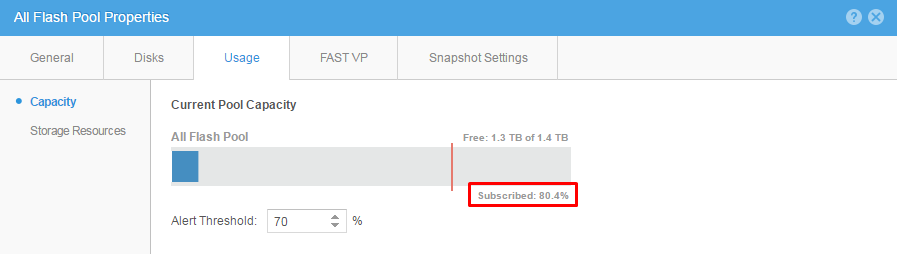
In order to see the breakdown of this percentage in details Run the following commands:
- Open SSH connection to the Unity, then use svc_arrayconfig H which creates the telemetry html file.
08:50:16 service@(none) spb:~> svc_arrayconfig -H
/EMC/backend/service/configuration_history/20161122_085022_ARRAYSERIALNUMBER_EMC-UEM-Telemetry.html
08:50:51 service@(none) spb:~>
Using WinScp to copy the file to the desktop open it and you can view in details everything regarding the pool.
Open the Telemetry file select Storage - Pool then check the details of the following:
- metadataSizeSubscribed
- sizeSubscribed
- snapSizeSubscribed
Additional Information
The following uemcli commands can also be used to check the following details:
uemcli /stor/prov/luns/lun show -detail >>> Views all LUNs
uemcli /stor/prov/fs show -detail >>> Views all File systems
uemcli /prot/snap show detail >>> Views all Snapshots.
Additional knowledge base articles referencing over subscribed Pools:
Dell EMC Unity : Pool size is showing over subscription (Customer Correctable)
Dell EMC Unity: Block/File storage resources invalidation behavior for over subscribed pools
Affected Products
Dell EMC Unity FamilyProducts
Dell EMC Unity FamilyArticle Properties
Article Number: 000022773
Article Type: How To
Last Modified: 07 Jul 2026
Version: 5
Find answers to your questions from other Dell users
Support Services
Check if your device is covered by Support Services.