Dell Unity: Resolving Stuck Batch Jobs Reporting Error Code 0x7D13151
Summary: This article describes the procedure for identifying and clearing stuck or suspended batch jobs in Dell Unity when jobs remain in a failed state and cannot be removed through Unisphere. ...
This article applies to
This article does not apply to
This article is not tied to any specific product.
Not all product versions are identified in this article.
Symptoms
The Unity administrator wants to remove or resolve suspended batch jobs seen in Unisphere. Canceling any of the suspended jobs results in one of the below errors:
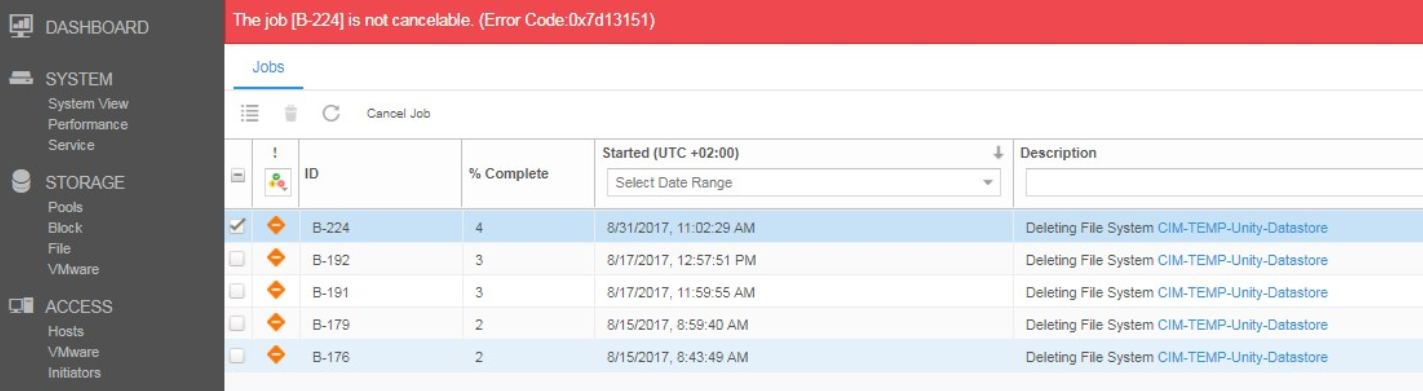
Figure 1. Error Code 0x7d13151 Output
The job [B-X] is not cancelable. (Error Code:0x7d13151)

Job cannot be deleted in the current state. (Error Code:0x6000df9)
Cause
This is functioning as designed.
Resolution
These jobs, once stuck or suspended, are normally unable to be removed using Unisphere or UEMCLI.
If the normal attempts fail, the stuck jobs must be removed manually. Contact Technical Support, or your Authorized Service Representative, and quote this KB article.
Additional Information
An upgrade precheck (health-check) fails due to suspended jobs.
Affected Products
Dell EMC Unity, Dell EMC Unity Family |Dell EMC Unity All Flash, Dell EMC Unity HybridArticle Properties
Article Number: 000059274
Article Type: Solution
Last Modified: 27 Jul 2026
Version: 13
Find answers to your questions from other Dell users
Support Services
Check if your device is covered by Support Services.