VxRail: VM fails to migrate automatically using DRS
Summary: VM fails to migrate automatically using DRS.
This article applies to
This article does not apply to
This article is not tied to any specific product.
Not all product versions are identified in this article.
Symptoms
DRS is unable to automatically migrate specific VMs. Other VMs are migrated successfully.
No Affinity rules are set.
No Affinity rules are set.
Cause
There are several settings that may cause this issue. See the settings below in Resolution.
Resolution
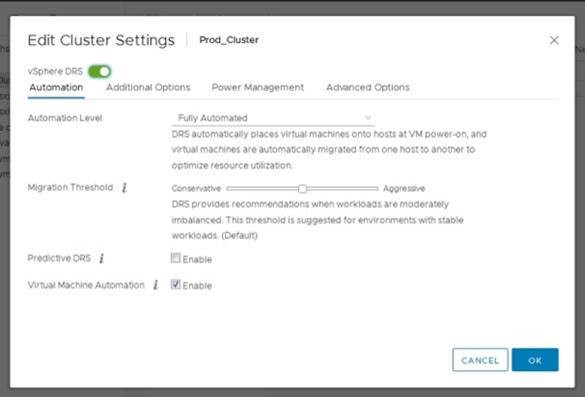
1. Check the DRS setting for Virtual Machine Automation that it is enabled. (VxRail cluster -> Configure -> vSphere DRS -> Edit)
2. Check VM Overrides entries (VxRail cluster-> Configure-> VM Overrides).
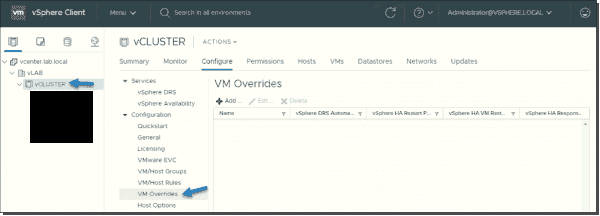
3. If a VM is found in the VM Overrides entries, check the corresponding vSphere DRS automation level. It is "Disabled" or "Manual," which is preventing DRS from automatically migrating the VM. Check if the VM entry can be deleted.
5. If the entry cannot be deleted, set the DRS automation level for the VM to "Fully Automated." This enables DRS to automatically migrate the VM.

3. If a VM is found in the VM Overrides entries, check the corresponding vSphere DRS automation level. It is "Disabled" or "Manual," which is preventing DRS from automatically migrating the VM. Check if the VM entry can be deleted.
5. If the entry cannot be deleted, set the DRS automation level for the VM to "Fully Automated." This enables DRS to automatically migrate the VM.
Article Properties
Article Number: 000067595
Article Type: Solution
Last Modified: 08 Sep 2025
Version: 5
Find answers to your questions from other Dell users
Support Services
Check if your device is covered by Support Services.