VxRail:虚拟机无法使用 DRS 自动迁移
Summary: 虚拟机无法使用 DRS 自动迁移。
This article applies to
This article does not apply to
This article is not tied to any specific product.
Not all product versions are identified in this article.
Symptoms
DRS 无法自动迁移特定虚拟机。其他虚拟机已成功迁移。
未设置关联性规则。
未设置关联性规则。
Cause
有几种设置可能会导致此问题。请参阅分辨率中的以下设置。
Resolution
1.检查 Virtual Machine Automation 的 DRS 设置是否已启用。(VxRail 群集 -> 配置 ->vSphere DRS ->编辑)

2.检查虚拟机覆盖条目(VxRail 群集 —>配置—>虚拟机覆盖)。
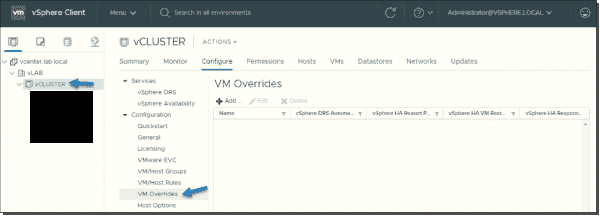
3.如果在 VM 覆盖条目中找到虚拟机,请检查相应的 vSphere DRS 自动化级别。它处于“已禁用”或“手动”状态,这会阻止 DRS 自动迁移虚拟机。检查是否可以删除虚拟机条目。
5.如果无法删除条目,请将虚拟机的 DRS 自动化级别设置为“完全自动化”。这使 DRS 能够自动迁移虚拟机。
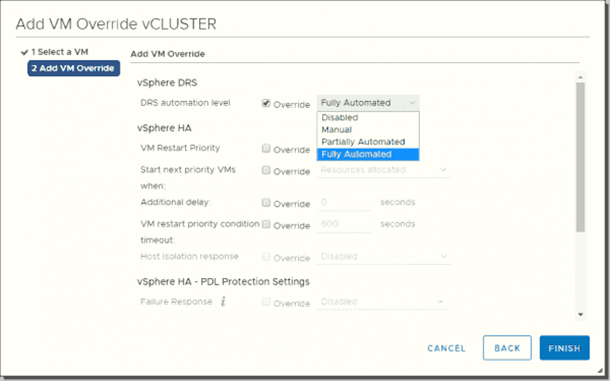
3.如果在 VM 覆盖条目中找到虚拟机,请检查相应的 vSphere DRS 自动化级别。它处于“已禁用”或“手动”状态,这会阻止 DRS 自动迁移虚拟机。检查是否可以删除虚拟机条目。
5.如果无法删除条目,请将虚拟机的 DRS 自动化级别设置为“完全自动化”。这使 DRS 能够自动迁移虚拟机。
Products
VxRail Appliance Family, VxRail P Series Nodes, VxRail S Series Nodes, VxRail Software, VxRail V Series Nodes, VxRail V470Article Properties
Article Number: 000067595
Article Type: Solution
Last Modified: 08 Sep 2025
Version: 5
Find answers to your questions from other Dell users
Support Services
Check if your device is covered by Support Services.