Unisphere for VMAX: SRDF Link and Pair States Guide
Summary: Unisphere for VMAX: Symmetrix Remote Data Facility (SRDF) Link and Pair States Guide
This article applies to
This article does not apply to
This article is not tied to any specific product.
Not all product versions are identified in this article.
Symptoms
Understanding Symmetrix Remote Data Facility (SRDF) link and pair states.
SRDF Device and Link States:
- Not Ready
- Ready
- Write Disabled
- Not Available
SRDF Pair States:
- SyncInProg
- Synchronized
- Split
- Failed Over
- R1 Updated
- R1 UpdInProg
- Suspended
- Partitioned
- Mixed
- Invalid
- Consistent
- Transmit Idle
Cause
Not applicable.
Resolution
The following information provides foundational knowledge to help with troubleshooting SRDF issues. The following content assumes that you understand SRDF devices, including R1, R11, R2, and R21.
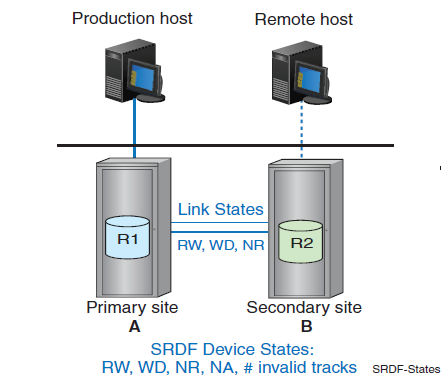
SRDF Device and Link States:
- Not Ready (NR): Reads and Writes are both disabled
- Ready (RW): Enabled for both Reads and Writes
- Write Disabled (WD): Enabled for Reads, but not Writes
Not Available (N/A): Unable to report on correct state.
SRDF Pair States:
An SRDF Pair State encompasses all the following:
- The SRDF device state on the source (R1) device.
- The SRDF device state on the target (R2) device.
- The number of tracks owed between the R1 and R2 devices ("Invalid Tracks").
- The SRDF link state between the R1 and R2 devices.
- SyncInProg:
A synchronization is in progress between the R1 and R2 devices.
There are existing invalid tracks between the two pairs, and the logical links between both sides of the SRDF pair are up. - Synchronized:
The R1 and R2 devices are in a Synchronized state.
The same content exists on both the R1 and R2 devices, so there are no invalid tracks between the pair. - Split:
The R1 and the R2 devices are both in a Ready (Read/Write enabled) state to their specific hosts, and the links between the two are either Not Ready (NR) or Write Disabled (WD). - Failed Over:
The R1 device is in either a Not Ready or a Write Disabled state.
In this case, operations have failed over to the R2 device, which is in a read/write state. - R1 Updated:
The R1 device is Not Ready or Write Disabled to its host.
There are no local invalid tracks on the R1 side (for example, owed to R1 from R2) and the links are in either a Ready or Write Disabled state. The R2 device is Read Write (RW) and accessible to the host. - R1 UpdInProg:
The R1 device is Not Ready or Write Disabled to its host.
There are invalid tracks owed to the R1 side, so data is being copied from the R2 device to the R1 device. The links are in a Ready state, and the R2 device is in an RW state. - Suspended:
The SRDF links have been suspended and are either in a Not Ready or Write Disabled state.
If the R1 device is in a Ready state while the links are suspended, any I/O accumulates invalid tracks owed to the R2 device. The R2 device is in a WD state. - Partitioned:
The Symmetrix Application Programming Interface (SYMAPI) is unable to communicate through the corresponding Symmetrix Remote Data Facility (SRDF) path to the remote array. This can occur if the links are down. This can also occur if communications are blocked due to symacl, symauth, or symavoid settings. It can also occur if the SRDF device cannot communicate with the correct type of remote device. For example, an R2 device is expecting the remote device to be an R1. If the personality of the remote device is also R2, or if it is a Thin Device (TDEV), this reports as Partitioned.
The Partitioned state may apply to devices within a Recovery Action (RA) group. For example, if the SYMAPI server is unable to communicate with a remote array from an RA group, devices in that RA group are marked as being in the Partitioned state. The state of the R1 and R2 can be either RW or WD.
A half pair and a duplicate pair are also reported as Partitioned. - Mixed:
A composite SYMAPI device group SRDF Pair state. For example, different SRDF Pair states within a specific device group. - Invalid:
This is the default state when no other SRDF state applies.
The combination of the R1 device, the R2 device, and the SRDF link states does not match any other pair state (see Table 1 below). This state may also occur if there is a problem at the director level. - Consistent:
The SRDF/Asynchronous (SRDF/A) capable devices are in a consistent state.
The Consistent state signifies the normal state of operation for device pairs operating in asynchronous mode. The R1 device is RW while the R2 device is WD. - Transmit Idle:
The Transmit Idle state for SRDF/A sessions cannot push data in the transmit cycle across the link because the link is down. This is similar to a Partitioned state.
Table 1. SRDF Device and Link State Combinations
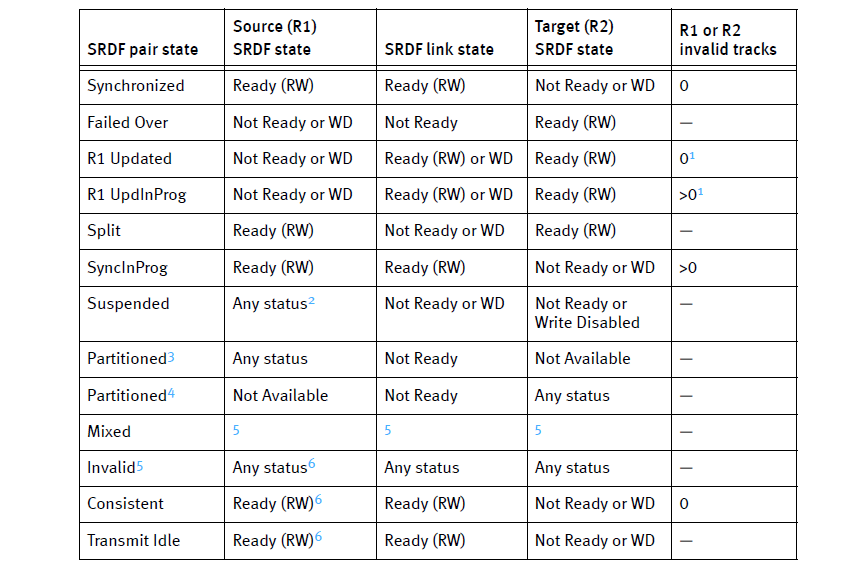
1. Refers to invalid local (R1) tracks on the source.
2. Any status value is possible (Ready, Not Ready, Write Disabled, or Not Available).
3. Viewed from the host locally connected to the source (R1) device.
4. Viewed from the host locally connected to the target (R2) device.
5. When no other SRDF state applies, the state defaults to Invalid.
6. The combination of source SRDF, SRDF links, and target SRDF statuses does not match any other SRDF state. The SRDF state is considered Invalid.
Affected Products
Solutions Enabler, Unisphere for VMAXArticle Properties
Article Number: 000070786
Article Type: Solution
Last Modified: 04 Aug 2025
Version: 3
Find answers to your questions from other Dell users
Support Services
Check if your device is covered by Support Services.