LED or Light Ring on a Dell AC Adapter is Off or Flickering
Summary: The following article provides information about the correct way to troubleshoot a Dell AC adapter if the status light is off or flickering. Dell AC adapters come with a status Light Emitting Diode (LED) on the adapter or a ring of them around the connector to the device. ...
This article applies to
This article does not apply to
This article is not tied to any specific product.
Not all product versions are identified in this article.
Symptoms
The adapters status LED does not stay on or comes on and flickers if the connection is loose. The AC adapters status LED can be on the adapter or a light ring on the cable. The power cable that plugs into the adapter brick from the wall outlet appears loose. The battery does not charge, and the device randomly shuts down when running with only the AC adapter connected.
Cause
This is due to a poor connection of the power cable to the AC adapter.
Resolution
Confirm that the power cable is correctly installed and is firmly seated to the AC adapter. Use the following steps to ensure that the power cable is plugged into the AC adapter:
-
Unplug the adapter cable from the device.
-
Unplug the power cable from the power source or wall outlet.
-
Remove the power cable from the AC adapter.
-
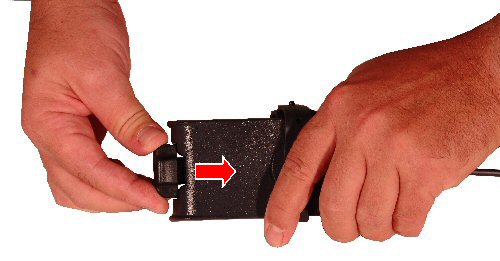
Use two hands to attach the power cable to the AC adapter. Hold the AC adapter in one hand, and place the power cable in position over the two or three prong connector on the AC adapter.
-
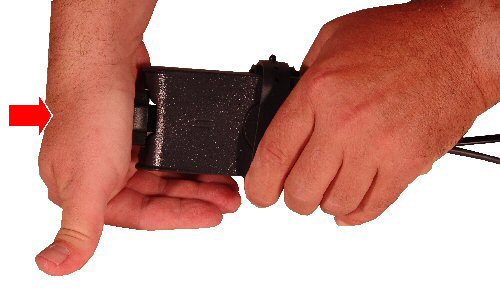
Using the palm of one hand, push the power cable in fully until it clicks.
-
Reconnect the AC adapter to the power source or wall outlet. Verify the LED or light ring on the AC adapter comes on and stays on, with no flicker.
-
Switch to the steps in the following article link if the issue continues:
Affected Products
Chromebook, G Series, Alienware, Dell Plus, Dell Pro, Dell Pro Max, Dell Pro Plus, Dell Pro Premium, Inspiron, Latitude, Dell Pro Rugged, Vostro, XPS, Mobile Workstations, Dell Dock WD15, Dell Dual Charge Dock HD22Q, Dell Pro Smart Dock SD25
, Dell Pro Thunderbolt 4 Smart Dock SD25TB4, Dell Pro Dock WD25, Dell Pro Thunderbolt 4 Dock WD25TB4, Dell Pro Dock WD25Z, Dell Rugged Desk Dock, Dell Thunderbolt Dock TB15, Dell Thunderbolt Dock TB16, Dell Precision Dual USB-C Thunderbolt Dock - TB18DC, Dell Universal Dock UD22, Dell Dock WD19, Dell Performance Dock - WD19DC, Dell Performance Dock – WD19DCS, Dell Dock – WD19S, Dell Thunderbolt Dock - WD19TB, Dell Thunderbolt Dock – WD19TBS, Dell Thunderbolt Dock – WD22TB4
...
Article Properties
Article Number: 000140032
Article Type: Solution
Last Modified: 01 May 2026
Version: 8
Find answers to your questions from other Dell users
Support Services
Check if your device is covered by Support Services.