Windows Server: Configuring Microsoft Cluster Sets on Dell PowerEdge
Summary: Guide on Configuring Cluster Sets on Windows Server 2019
This article applies to
This article does not apply to
This article is not tied to any specific product.
Not all product versions are identified in this article.
Instructions
Cluster Sets, introduced in Windows Server 2019 (WS19) improves SDDC (Software Defined Data Center) flexibility and resilience. Cluster Set is a technology that allows administrators to combine multiple Windows 2019 Clusters into a single umbrella of Clusters.
Existing failover clusters can accommodate a maximum of 64 nodes. Cluster Sets technology combines multiple WS19 clusters in a single domain, with each of these clusters supporting up to 64 WS19 nodes. Compared to a Failover-Cluster, Cluster Set has more resiliency. For example, a 4-node failover cluster can survive 2-node failure. With the same 4-node cluster if we divide into two 2-node clusters and form a cluster sets out of it, it can survive one cluster failure plus one node failure from the remaining cluster. So, it can survive 3 node failures altogether.
For an overview of Cluster-Sets feature in Server 2019 refer "Introduction-to-cluster-sets-in-windows-server-2019
Lab Setup for Deploying Cluster Set on PowerEdge
Servers Used: Two PowerEdge R730XD’s and Two PowerEdge R740XD’s
- Created the first cluster using the two R730XD’s and named
S2D13G54(called Member Cluster 1). - Created the second cluster using the two R740XD’s and named
S2D14G54(called Member Cluster 2). - Created two CSV volumes on each of the above created Clusters.
- Created a VM ‘
vm1’ onMember Cluster 1and a VM ‘vm2’ onMember Cluster 2.Then, I combined these two VMs to create a Management Cluster (namedmgClus54) for the Cluster Set. No shared storage is required while creating the Management Cluster.
Installed the File-Services role in each of the nodes in the Member Cluster 1, Member Cluster 2 and Management Cluster:
Install-WindowsFeature File-Services -IncludeAllSubFeature –IncludeManagementTools –Restart
Created an Infrastructure SOFS File Server on Member Cluster 1, Member Cluster 2 and the Management Cluster:
Add-ClusterScaleOutFileServerRole -Name -Infrastructure
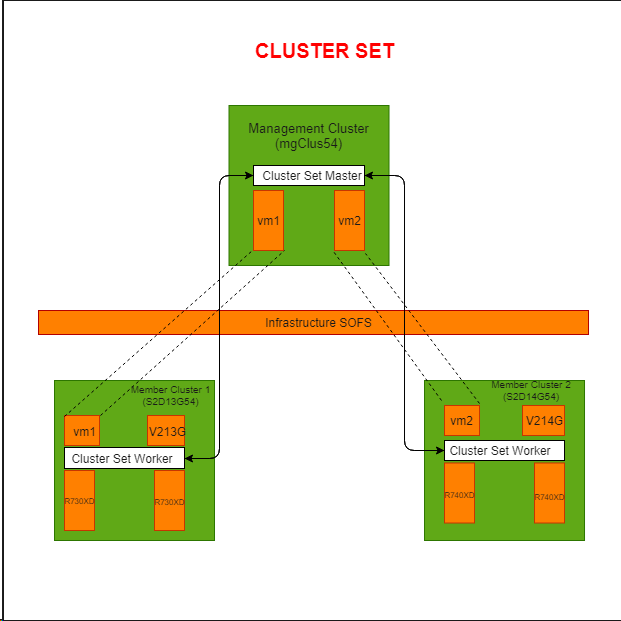
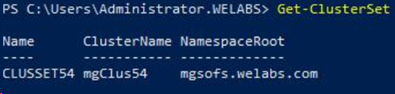
Created a Cluster Set named CLUSSET54:
New-ClusterSet -Name CLUSSET54 -NamespaceRoot -CimSession
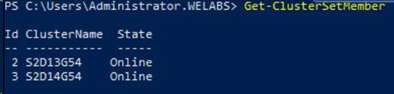
And then add the created S2D14G54 and S2D13G54 Cluster to the cluster to the ClusterSet:
Add-ClusterSetMember -ClusterName S2D14G54 -CimSession -InfraSOFSName
Then I deploy
Get-ClusterSetMember -ClusterName | Register-ClusterSetVM -VMName
For Testing live migration across clusters, I tried to migrate VM "V213G" to Member Cluster 2. Before performing migration across clusters, we need to consider below points:
- VM settings, Processor Compatibility should be enabled.
- Configure Kerberos constrained delegation (KCD) between all pairs of cross-cluster nodes
- Constrained delegation guidance
- Configure the cross-cluster virtual machine live migration authentication type to Kerberos on each node in the Cluster Set.
- Constrained delegation guidance
- foreach($h in $hosts){Set-VMHost -VirtualMachineMigrationAuthenticationType Kerberos -computerName $h }
-
-
- Add the management cluster to the local administrators group on each node in the cluster set.
-
- foreach($h in $hosts){ Invoke-Command -ComputerName $h -ScriptBlock {Net localgroup administrators /add $} }
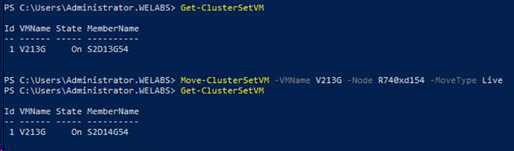
For performing any maintenance activity of a cluster in Cluster Set, migrate all the VMs that are part of the cluster to other clusters in the Cluster Set and then remove Cluster from the Cluster Set:
Remove-ClusterSetMember -ClusterName -CimSession
After performing the maintenance activity, add back the cluster to the Cluster Set.
In case of unexpected failure of a Member Cluster, Cluster Set is not intelligent enough to handle the fail-over. Only manual movement of resources from one cluster to another cluster is supported in Windows Server 2019; even though automatic VM failover continue to function within a single member cluster scope.
Existing failover clusters can accommodate a maximum of 64 nodes. Cluster Sets technology combines multiple WS19 clusters in a single domain, with each of these clusters supporting up to 64 WS19 nodes. Compared to a Failover-Cluster, Cluster Set has more resiliency. For example, a 4-node failover cluster can survive 2-node failure. With the same 4-node cluster if we divide into two 2-node clusters and form a cluster sets out of it, it can survive one cluster failure plus one node failure from the remaining cluster. So, it can survive 3 node failures altogether.
After performing the maintenance activity, add back the cluster to the Cluster Set.
In case of unexpected failure of a Member Cluster, Cluster Set is not intelligent enough to handle the fail-over. Only manual movement of resources from one cluster to another cluster is supported in Windows Server 2019; even though automatic VM failover continue to function within a single member cluster scope.
This blog has been written by DELL Engineer AS Nithya Priya
Affected Products
Microsoft Windows Server 2019Article Properties
Article Number: 000147500
Article Type: How To
Last Modified: 02 May 2026
Version: 8
Find answers to your questions from other Dell users
Support Services
Check if your device is covered by Support Services.