Precision 5530 2-i-1: Tastaturfunktionsvejledning
Summary: Følgende vejledning viser de tilgængelige tastaturgenveje og de funktioner, de udfører på den mobile Dell Precision 5530 2-i-1-workstation.
This article applies to
This article does not apply to
This article is not tied to any specific product.
Not all product versions are identified in this article.
Symptoms
Tastaturgenvejsfunktioner
Nedenstående tabel viser en liste over kombinationsgenvejstastfunktioner til den bærbare Precision 5530 2-i-1-workstation
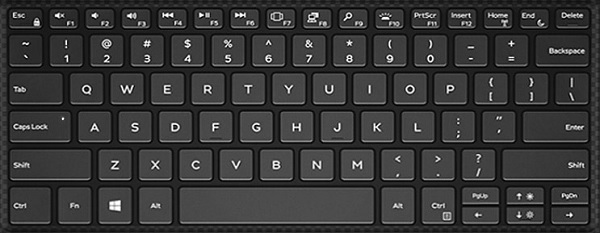
Cause
| Genvejstastkombinationer | Resultat |
|---|---|
| Fn + F1 | Slå højttalere fra |
| Fn + F2 | Skru ned for lyden |
| Fn + F3 | Skru op for lyden |
| Fn + F4 | Spol tilbage |
| Fn + F5 | Afspil/pause |
| Fn + F6 | Fremad |
| Fn + F7 | Start opgavevisning |
| Fn + F8 | Skift skærm (Win + P) |
| Fn + F9 | Søg |
| Fn + F10 | Slå baggrundslys til og fra |
| Fn + F11 | PrtScr |
| Fn + F12 | Indsæt |
| Fn + Esc | Slå Fn-tastelås til og fra |
| Fn + Home | Slå trådløs til/fra |
| Fn + End | Dvale |
| Fn + Pil op | Forøgelse af LCD-lysstyrke |
| Fn + Pil ned | Reduktion af LCD-lysstyrke |
Resolution
 Besøg vores vidensbase for tastatur for at få flere ressourcer og oplysninger.
 Du kan finde flere artikler og oplysninger på vores supportside til pegefeltet.
 Du kan også finde yderligere artikler og oplysninger på vores side med support til mus.
Affected Products
Precision 5530 2 in 1Article Properties
Article Number: 000148637
Article Type: Solution
Last Modified: 03 May 2026
Version: 6
Find answers to your questions from other Dell users
Support Services
Check if your device is covered by Support Services.