File Explorer in Windows 10 stops responding when opened
Summary: This article describes an issue where File Explorer in Windows 10 stops responding when opened.
This article applies to
This article does not apply to
This article is not tied to any specific product.
Not all product versions are identified in this article.
Symptoms
Note: Microsoft will end support for Windows 10 on October 14, 2025. See our Microsoft Windows 10 End of Support Announcement for more information.
The File Explorer application in Windows 10 may default to Quick Access when it is opened. This can cause the computer to stop responding when a reference in Quick Access is either corrupt or is no longer available.
To test the File Explorer:
- Click the Windows start menu
- Type "C:"
- Check if File Explorer opens and allows you to navigate without it failing to respond (Where Quick Access is not selected)
The problem is most likely associated to the Quick Access cache - Clear the cache to prevent the problem from recurring
Note: If the File Explorer does not open, this article does not apply.
Cause
The problem is with the Quick Access cache for the File Explorer application.
Resolution
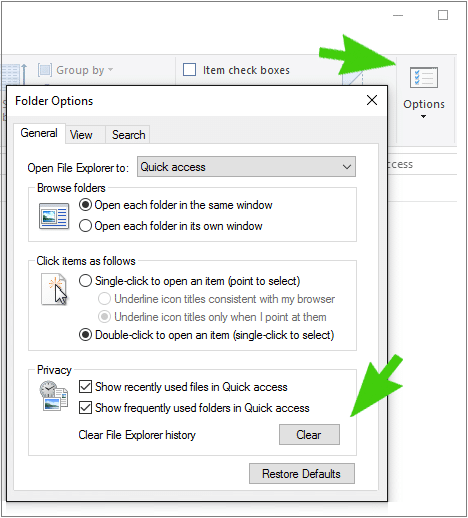
The following steps take you through clearing the Quick Access and Recent Files and Folders cache in Windows 10:
- Open File Explorer from the start menu by typing "C:"
- Click the View tab
- Click Options
- Under the Privacy tab, click the Clear box
- Click Ok
Affected Products
Alienware, Dell All-in-One, Dell Pro All-in-One, Dell Pro Max Micro, Dell Pro Max Slim, Dell Pro Max Tower, Dell Pro Micro, Dell Pro Slim, Dell Pro Tower, Dell Slim, Dell Tower, Inspiron, Legacy Desktop Models, OptiPlex, Vostro, XPS, G Series
, G Series, Alienware, Dell Plus, Dell Pro, Dell Pro Max, Dell Pro Plus, Dell Pro Premium, Latitude, Dell Pro Rugged, Vostro, XPS, Legacy Laptop Models, Fixed Workstations, Mobile Workstations, Dell Pro Max Micro XE FCM2250, Dell Pro Max Slim XE FCS1250, Dell Pro Max Tower T2 XE FCT2250, Dell Pro Max 16 XE MC16250, Dell Pro Micro Plus XE QBM1250, Dell Pro Slim Plus XE5 QBS1250, Dell Pro Tower Plus XE5 QBT1250
...
Article Properties
Article Number: 000148808
Article Type: Solution
Last Modified: 03 May 2026
Version: 11
Find answers to your questions from other Dell users
Support Services
Check if your device is covered by Support Services.