Steps to Reset MaxxAudio Pro Functionality
Summary: Information about how to enable MaxxAudio Pro functionality after it has been lost.
This article applies to
This article does not apply to
This article is not tied to any specific product.
Not all product versions are identified in this article.
Symptoms
Cause
No cause information is available.
Resolution
Reset MaxxAudio Pro
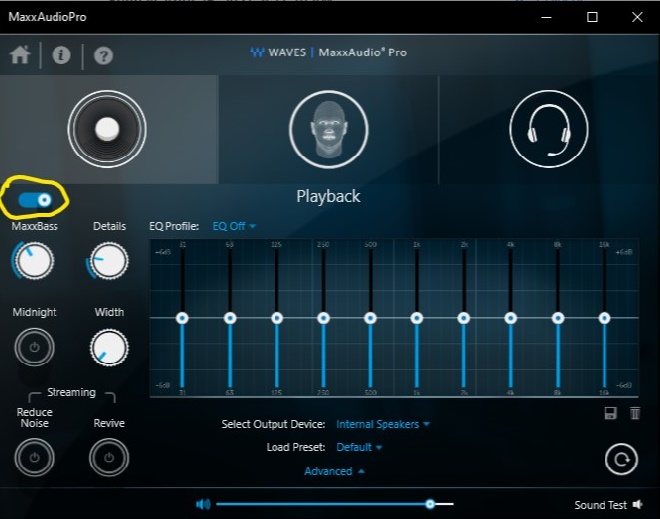
To reset the MaxxAudio Pro application, disable and enable the MaxxAudio Pro "Playback" function. It resets all functions in the MaxxAudio Pro application, and you can adjust audio settings.
Workaround
The easiest way to fix this issue is to disable and enable the "Playback" function in the MaxxAudio Pro application.
More Information:
How to install the Waves "MaxxAudio Pro" application by command line:
- Download the latest version of the Waves MaxxAudio Pro application from the Dell Support site.
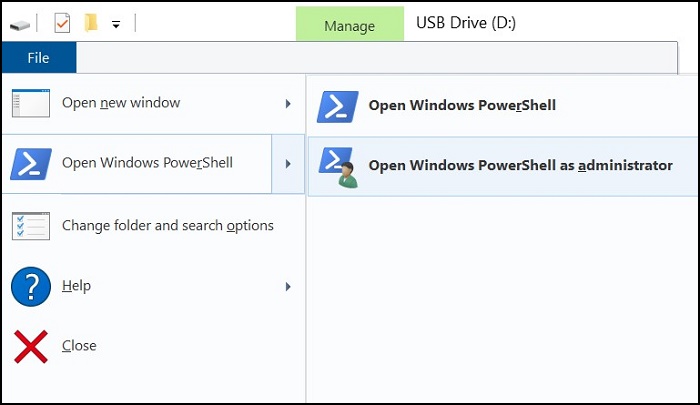
- Run Powershell as an Admin.
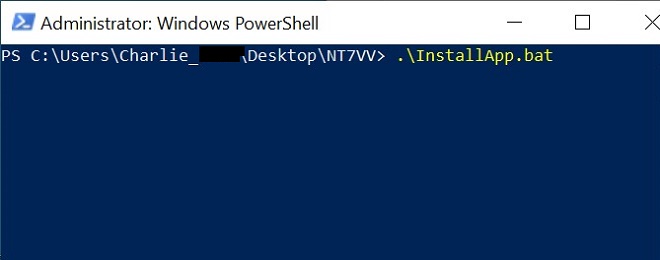
- Run the following command in the folder where the application file was downloaded: .\InstallApp.bat
Article Properties
Article Number: 000187742
Article Type: Solution
Last Modified: 10 May 2026
Version: 4
Find answers to your questions from other Dell users
Support Services
Check if your device is covered by Support Services.