重設 MaxxAudio Pro 功能的步驟
Summary: 如何在遺失後啟用 MaxxAudio Pro 功能的相關資訊。
This article applies to
This article does not apply to
This article is not tied to any specific product.
Not all product versions are identified in this article.
Symptoms
Cause
沒有可用的原因資訊。
Resolution
重設 MaxxAudio Pro
若要重設 MaxxAudio Pro 應用程式,請停用並啟用 MaxxAudio Pro「播放」功能。它會重設 MaxxAudio Pro 應用程式中的所有功能,並且您可以調整音訊設定。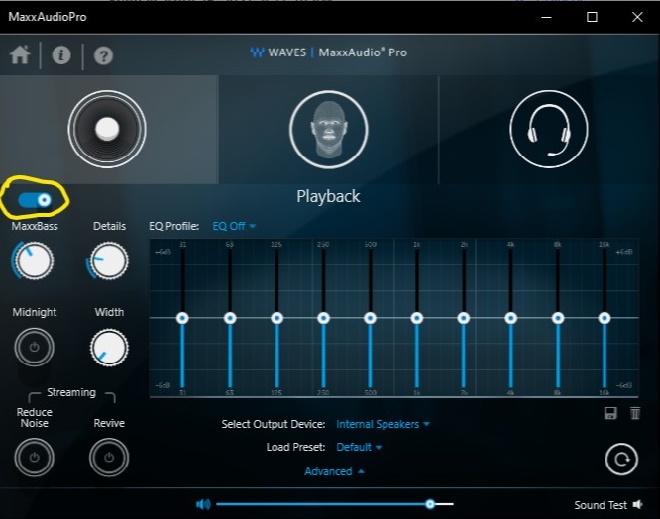
因應措施
解決此問題最簡單的方法是停用並啟用 MaxxAudio Pro 應用程式中的「播放」功能。
更多資訊:
如何透過命令列安裝 Waves「MaxxAudio Pro」應用程式:
- 從 Dell 支援網站下載最新版本的 Waves MaxxAudio Pro 應用程式。
- 以系統管理員身分執行 Powershell 。
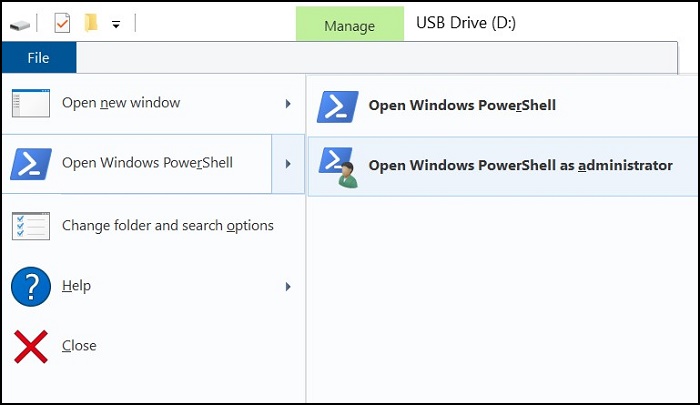
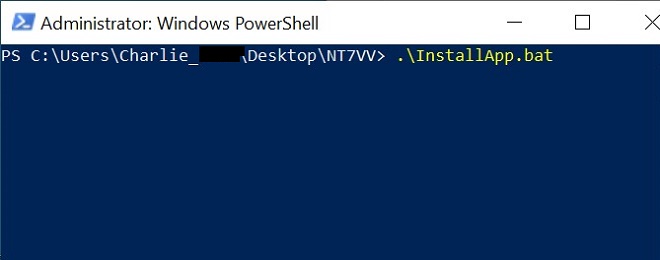
- 在下載應用程式檔案的資料夾中執行以下命令:.\InstallApp.bat
Article Properties
Article Number: 000187742
Article Type: Solution
Last Modified: 02 Oct 2025
Version: 3
Find answers to your questions from other Dell users
Support Services
Check if your device is covered by Support Services.