MaxxAudio Proの機能をリセットする手順
Summary: MaxxAudio Proの機能が失われた後に有効にする方法に関する情報。
This article applies to
This article does not apply to
This article is not tied to any specific product.
Not all product versions are identified in this article.
Symptoms
Cause
原因に関する情報はありません。
Resolution
MaxxAudio Proのリセット
MaxxAudio Proアプリケーションをリセットするには、MaxxAudio Proの「再生」機能を無効にしてから有効にします。MaxxAudio Proアプリケーションのすべての機能がリセットされ、オーディオ設定を調整できます。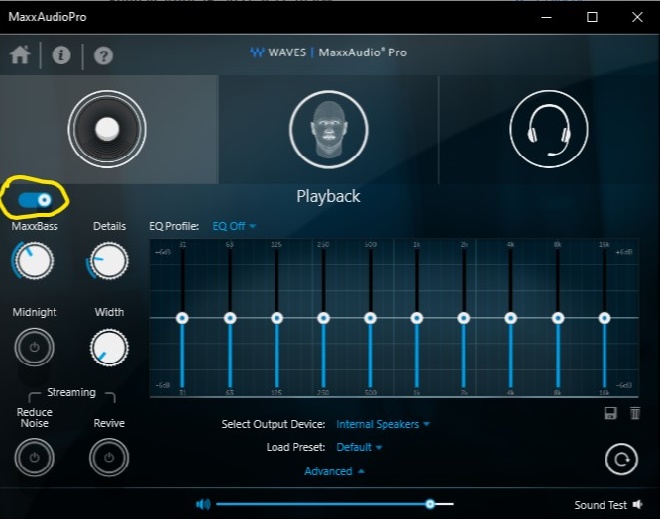
対策
この問題を解決する最も簡単な方法は、MaxxAudio Proアプリケーションで「再生」機能を無効にして有効にすることです。
詳細情報。
コマンド ラインでWaves「MaxxAudio Pro」アプリケーションをインストールする方法:
- Dellサポート サイトからWaves MaxxAudio Proアプリケーションの最新バージョンをダウンロードします。
- 管理者としてPowerShellを実行します。
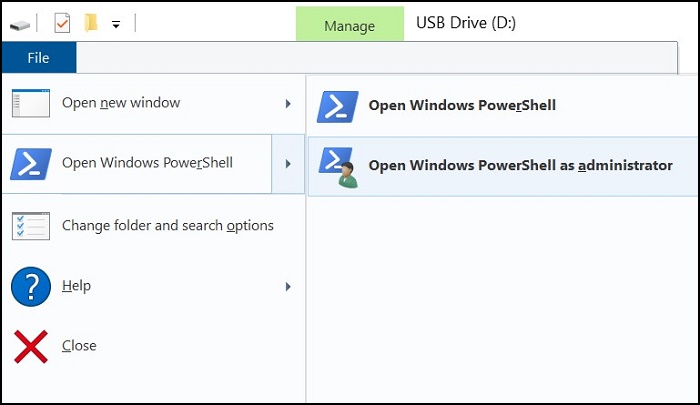
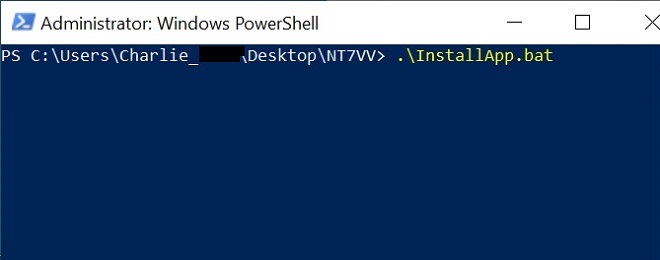
- アプリケーション ファイルがダウンロードされたフォルダーで、次のコマンドを実行します。.\InstallApp.bat
Article Properties
Article Number: 000187742
Article Type: Solution
Last Modified: 02 Oct 2025
Version: 3
Find answers to your questions from other Dell users
Support Services
Check if your device is covered by Support Services.