OptiPlex 3000 Thin Client Secondary SSD Not Displayed in Boot Menu
Summary: User who purchase a Dell OptiPlex 3000 Thin Client unit with eMMC storage, and then install an SSD drive may not see the added storage in the F12 One-time Boot Menu.
This article applies to
This article does not apply to
This article is not tied to any specific product.
Not all product versions are identified in this article.
Symptoms
Affected Products:
- OptiPlex 3000 Thin Client
An additional SSD drive will fail to appear in the F12 One-Time Boot Menu, after installation in an OptiPlex 3000 Thin Client.
Cause
Note: The OptiPlex 3000 Thin Client onboard storage and SSD devices are mutually exclusive.
Resolution
The user must alter the enabled storage option in the system BIOS settings.
- Power on the computer and press F2 to enter BIOS setup.
- Select Storage on the left menu.
- Choose the M.2 PCIe SSD in the drop-down menu under Port Enablement.
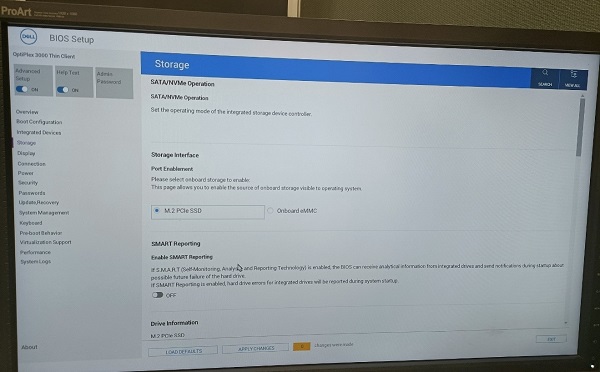
Figure 1: (English Only) Dell BIOS
- Select the APPLY CHANGES button and press OK to save the change.
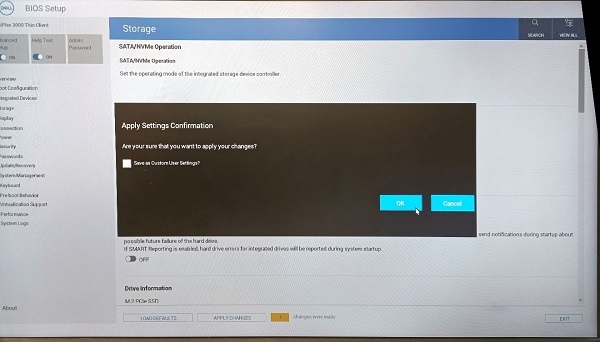
Figure 2: (English Only) Apply Changes and Press OK
- Select the EXIT button to exit BIOS setup.
Affected Products
OptiPlex 3000 Thin ClientArticle Properties
Article Number: 000196679
Article Type: Solution
Last Modified: 13 May 2026
Version: 7
Find answers to your questions from other Dell users
Support Services
Check if your device is covered by Support Services.