PowerStore: Unable to map storage network - not applicable for mapping.
Summary: Starting with PowerStoreOS 2.0, additional I/O Modules can be added after the initial deployment of a PowerStore. A service script must be run to commit the new I/O Modules to the configuration before they can be used. ...
This article applies to
This article does not apply to
This article is not tied to any specific product.
Not all product versions are identified in this article.
Symptoms
The MAP STORAGE NETWORK button is greyed out when trying to assign a storage network to the new I/O module: One or more of the selected ports are not applicable for mapping.
Tag for Replication is greyed out: One or more of the selected ports are not applicable for tagging.
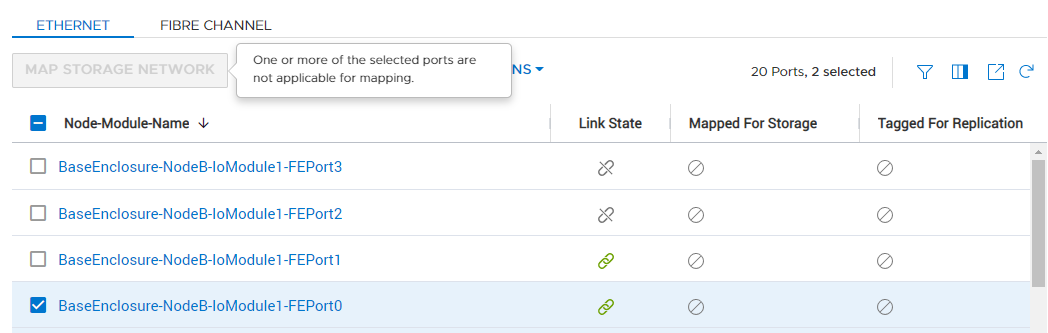

Tag for Replication is greyed out: One or more of the selected ports are not applicable for tagging.
Cause
If an I/O Module is added to the PowerStore after the initial deployment, a Storage Network can be assigned to the ports, and the I/O Module can be used.
To tag a port for replication, at least one storage network must be mapped to the Ethernet port.
To tag a port for replication, at least one storage network must be mapped to the Ethernet port.
Resolution
The commit status can be checked using the service script svc_commit_slic status <0/1>
Examples for slot 0: svc_commit_slic status 0
Not yet committed I/O Module:
Committed I/O Module:
For further guidance on how to use this script, see svc_commit_slic -h.
If you experience any issues during this process, contact Dell EMC Technical Support or your Authorized Service Representative, and quote this Knowledgebase article ID.
Examples for slot 0: svc_commit_slic status 0
Not yet committed I/O Module:
[SVC:service@16XXXXX-A user]$ svc_commit_slic status 0 ------------------------------ Slot 0, NodeA -------------------------- SLIC:BaseEnclosure-NodeA-IoModule0,use:ready_for_activation, state:Healthy, comp_state:ok, power:on, model:32 Gb Fibre v1 ““““ ““““ Engine state machine: IOM_ACTIVATION_STATE_NOT_STARTED Platform activation state: READY_FOR_ACTIVATION |
Committed I/O Module:
[SVC:service@16XXXXX-A user]$ svc_commit_slic status 0 ------------------------------ Slot 0, NodeA ------------------------------ SLIC:BaseEnclosure-NodeA-IoModule0, use:in_use, state:Healthy, comp_state:ok, power:on, model:32 Gb Fibre v1 ““““ ““““ Engine state machine: IOM_ACTIVATION_STATE_NOT_STARTED Platform activation state: ACTIVATED |
For further guidance on how to use this script, see svc_commit_slic -h.
If you experience any issues during this process, contact Dell EMC Technical Support or your Authorized Service Representative, and quote this Knowledgebase article ID.
Affected Products
PowerStore 1000X, PowerStore 1000T, PowerStore 3000X, PowerStore 3000T, PowerStore 5000X, PowerStore 5000T, PowerStore 500T, PowerStore 7000X, PowerStore 7000T, PowerStore 9000TProducts
PowerStore 9000XArticle Properties
Article Number: 000199111
Article Type: Solution
Last Modified: 28 Jun 2023
Version: 3
Find answers to your questions from other Dell users
Support Services
Check if your device is covered by Support Services.