VxRail: Wizard voor knooppunt toevoegen Tabblad "Netwerkinstellingen" is leeg
Summary: Het tabblad Wizard knooppunt toevoegen is leeg omdat IPv6 niet is ingeschakeld op vmk0.
This article applies to
This article does not apply to
This article is not tied to any specific product.
Not all product versions are identified in this article.
Symptoms
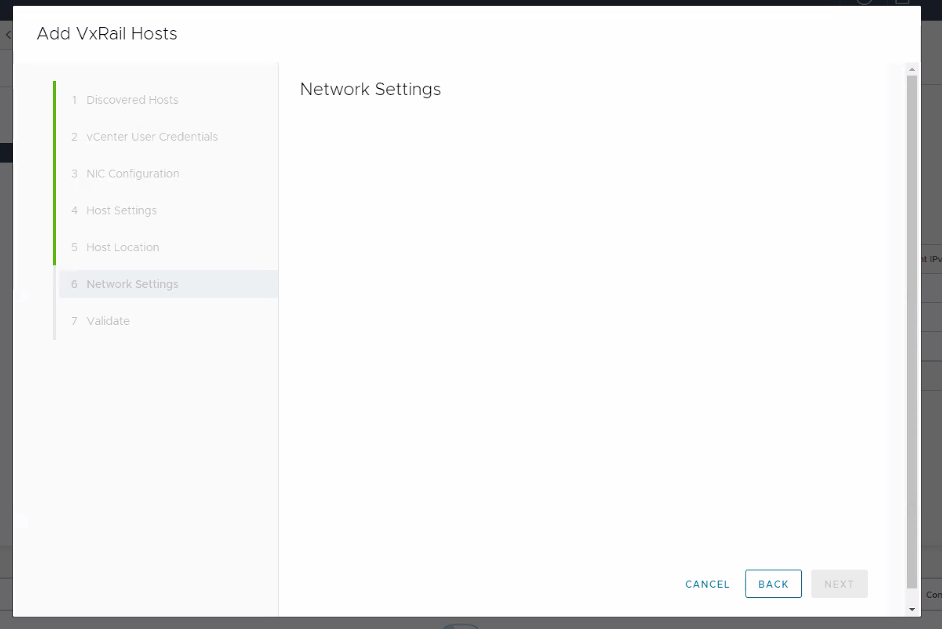
Rapport over soortgelijke problemen in short.term.log:
"2022-11-02 21:11:52,427" microservice.ms-day2 "2022-11-02T21:11:51.679285223Z stdout F 2022-11-02 21:11:51,679 [INFO] <ThreadPoolExecutor-0_25:140582357804800> segment_network_service.py format_network_info() (62): Create network info for traffic: management"
"2022-11-02 21:11:52,427" microservice.ms-day2 "2022-11-02T21:11:51.679355458Z stdout F 2022-11-02 21:11:51,679 [INFO] <ThreadPoolExecutor-0_25:140582357804800> global_config_handler.py _get_from_config_service() (26): get ip_version from configuration service..."
"2022-11-02 21:11:52,427" microservice.ms-day2 "2022-11-02T21:11:51.687939041Z stdout F 2022-11-02 21:11:51,687 [ERROR] <ThreadPoolExecutor-0_25:140582357804800> exp_general_controller.py get() (123): Internal Error During fetching cluster network info."
"2022-11-02 21:11:52,427" microservice.ms-day2 "2022-11-02T21:11:51.687954848Z stdout F Traceback (most recent call last):"
"2022-11-02 21:11:52,427" microservice.ms-day2 "2022-11-02T21:11:51.687959497Z stdout F   File ""/home/app/runtime_operations_app/main/controllers/exp_general_controller.py"", line 119, in get"
"2022-11-02 21:11:52,427" microservice.ms-day2 "2022-11-02T21:11:51.687964135Z stdout F     network_info = ClusterNetwork().get_network()"
"2022-11-02 21:11:52,427" microservice.ms-day2 "2022-11-02T21:11:51.68796846Z stdout F   File ""/home/app/runtime_operations_app/main/services/segment_network_service.py"", line 85, in get_network"
"2022-11-02 21:11:52,427" microservice.ms-day2 "2022-11-02T21:11:51.687972257Z stdout F     network_info[traffic_type] = self.format_network_info(traffic_type)"
"2022-11-02 21:11:52,427" microservice.ms-day2 "2022-11-02T21:11:51.687976359Z stdout F   File ""/home/app/runtime_operations_app/main/services/segment_network_service.py"", line 63, in format_network_info"
"2022-11-02 21:11:52,427" microservice.ms-day2 "2022-11-02T21:11:51.68798425Z stdout F     ip_list, ipv6_list = self._get_ip_list(traffic_type)"
"2022-11-02 21:11:52,427" microservice.ms-day2 "2022-11-02T21:11:51.687987733Z stdout F   File ""/home/app/runtime_operations_app/main/services/segment_network_service.py"", line 40, in _get_ip_list"
"2022-11-02 21:11:52,427" microservice.ms-day2 "2022-11-02T21:11:51.687991083Z stdout F     all_traffic_info = self._get_all_traffic_info()"
"2022-11-02 21:11:52,427" microservice.ms-day2 "2022-11-02T21:11:51.687994504Z stdout F   File ""/home/app/runtime_operations_app/main/services/segment_network_service.py"", line 36, in _get_all_traffic_info"
"2022-11-02 21:11:52,427" microservice.ms-day2 "2022-11-02T21:11:51.687997846Z stdout F     self.all_traffic_info = NetworkAdaptiveInfoHandler().retrieve_all_hosts_traffic_info()"
"2022-11-02 21:11:52,427" microservice.ms-day2 "2022-11-02T21:11:51.688021672Z stdout F   File ""/home/app/runtime_operations_app/main/services/network_adaptive_info_handler.py"", line 548, in retrieve_all_hosts_traffic_info"
"2022-11-02 21:11:52,427" microservice.ms-day2 "2022-11-02T21:11:51.688026171Z stdout F     all_traffic_info[hostname] = self.formatter.format_host_traffic_info(hostname, raw_traffic_info)"
"2022-11-02 21:11:52,427" microservice.ms-day2 "2022-11-02T21:11:51.688041779Z stdout F   File ""/home/app/runtime_operations_app/main/services/network_adaptive_info_handler.py"", line 335, in format_host_traffic_info"
"2022-11-02 21:11:52,427" microservice.ms-day2 "2022-11-02T21:11:51.688045478Z stdout F     formatted_traffic_info: TrafficInfo = self.format_host_specified_traffic_info(host, cluster_portgroups_info, traffic_type)"
"2022-11-02 21:11:52,427" microservice.ms-day2 "2022-11-02T21:11:51.688048698Z stdout F   File ""/home/app/runtime_operations_app/main/services/network_adaptive_info_handler.py"", line 286, in format_host_specified_traffic_info"
"2022-11-02 21:11:52,427" microservice.ms-day2 "2022-11-02T21:11:51.688052231Z stdout F     network_info = self._get_host_specified_traffic_network_info(host, traffic_type)"
"2022-11-02 21:11:52,427" microservice.ms-day2 "2022-11-02T21:11:51.688055943Z stdout F   File ""/home/app/runtime_operations_app/main/services/network_adaptive_info_handler.py"", line 282, in _get_host_specified_traffic_network_info"
"2022-11-02 21:11:52,427" microservice.ms-day2 "2022-11-02T21:11:51.688060631Z stdout F     network_info = self._get_specified_network_info(vnics, lambda vnic : vnic['device'] == vmk)"
"2022-11-02 21:11:52,427" microservice.ms-day2 "2022-11-02T21:11:51.68806382Z stdout F   File ""/home/app/runtime_operations_app/main/services/network_adaptive_info_handler.py"", line 136, in _get_specified_network_info"
"2022-11-02 21:11:52,427" microservice.ms-day2 "2022-11-02T21:11:51.688067352Z stdout F     interface_ipv6, prefix_len, v6_gateway = self._get_vnic_ipv6_addr_prefix_len_and_gw(vnic)"
"2022-11-02 21:11:52,427" microservice.ms-day2 "2022-11-02T21:11:51.688070245Z stdout F   File ""/home/app/runtime_operations_app/main/services/network_adaptive_info_handler.py"", line 107, in _get_vnic_ipv6_addr_prefix_len_and_gw"
"2022-11-02 21:11:52,427" microservice.ms-day2 "2022-11-02T21:11:51.688073697Z stdout F     ipv6_addresses = ipv6_config.get('ipV6Address', [])"
"2022-11-02 21:11:52,427" microservice.ms-day2 "2022-11-02T21:11:51.688076866Z stdout F AttributeError: 'NoneType' object has no attribute 'get'"
"2022-11-02 21:11:52,427" microservice.ms-day2 "2022-11-02T21:11:51.688504301Z stdout F 2022-11-02 21:11:51,688 [WARNING] <ThreadPoolExecutor-0_25:140582357804800> api_error_handler.py unexpected_error_handler() (14): Got unexpected error : Invalid status argument"
Cause
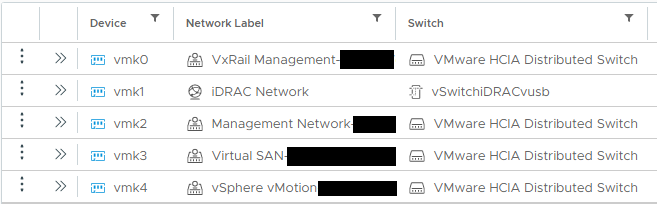
Tijdens een knooppuntuitbreiding haalt VxRail Manager (VRM) alle IP-informatie van de bestaande knooppunten. In dit geval is ipv6 uitgeschakeld aan de kant van een of meer knooppunten, waardoor VRM de informatie niet kan ophalen.
Bestaande VxRail clusterknooppunten moeten de onderstaande vmk's hebben en vmk0 ingeschakeld met ipv6:
Resolution
Om dit probleem op te lossen:
- Meld u aan bij vSphere.
- Verplaatsen naar ESXi ->Configuratie ->VMkernel adapters -> vmk0 van "VxRail Management-XXX" netwerk.
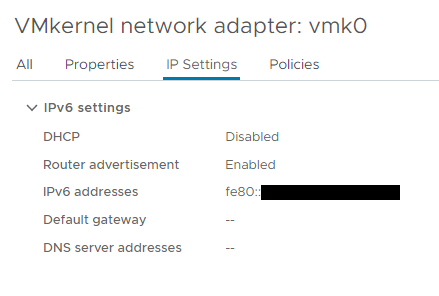
- Bewerk de instelling van vmk0 -> Ga naar de ipv6-instellingenpagina -> selecteer "IPV6-adres automatisch verkrijgen via routeradvertentie."

- Ga naar de pagina "IP-instellingen" van vmk0 en controleer met de verwachte output:
- Probeer de actie Host toevoegen opnieuw uit te voeren.
Als het tabblad "IPv6 settings" niet beschikbaar is, volgt u de VMware-procedure om IPv6 in te schakelen (host opnieuw opstarten vereist): IPv6-support activeren of deactiveren op een host
Additional Information
Als vmk0 voor het iDRAC-netwerk is en vmk1 ontbreekt, raadpleegt u het artikel: VxRail: Fysieke weergave werkt niet of het knooppunt ontbreekt op de pagina Hosts
Affected Products
VxRail, VxRail 460 and 470 Nodes, VxRail Appliance Series, VxRail G Series Nodes, VxRail D Series Nodes, VxRail D560, VxRail D560F, VxRail E Series Nodes, VxRail E460, VxRail E560, VxRail E560F, VxRail E560N, VxRail E660, VxRail E660F, VxRail E660N
, VxRail E665, VxRail E665F, VxRail E665N, VxRail G560, VxRail G560F, VxRail P Series Nodes, VxRail P470, VxRail P570, VxRail P570F, VxRail P580N, VxRail P670F, VxRail P670N, VxRail P675F, VxRail P675N, VxRail S Series Nodes, VxRail S470, VxRail S570, VxRail S670, VxRail Software, VxRail V Series Nodes, VxRail V470, VxRail V570, VxRail V570F, VXRAIL V670F, VxRail VD-4510C, VxRail VD-4520C, VxRail VD Series Nodes, VxRail VE-660, VxRail VE-6615, VxRail VE-670, VxRail VP-760, VxRail VP-7625, VxRail VP-770, VxRail VS-760
...
Article Properties
Article Number: 000205351
Article Type: Solution
Last Modified: 24 Apr 2026
Version: 5
Find answers to your questions from other Dell users
Support Services
Check if your device is covered by Support Services.