Cloudlink sftp backup store error “auth fail” fixing
Summary: Resolving error “Auth fail” when testing access to an sftp backup store.
This article applies to
This article does not apply to
This article is not tied to any specific product.
Not all product versions are identified in this article.
Symptoms
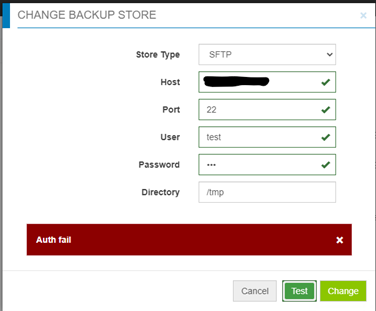
Auth fail” when testing access to an sftp backup store:
Cause
- Password is incorrect.
- Password authentication on the target server is disabled (only Challenge response is enabled) - Cloudlink is using password authentication for sftp backup store, but not challenge response.
Resolution
If it is not the incorrect password case, check the file /etc/ssh/sshd_config on the target server, find “PasswordAuthentication” setting.
If PasswordAuthentication is set to “no”, change to “yes”, then restart the ssh service.
For example: “systemctl restart sshd.service”.
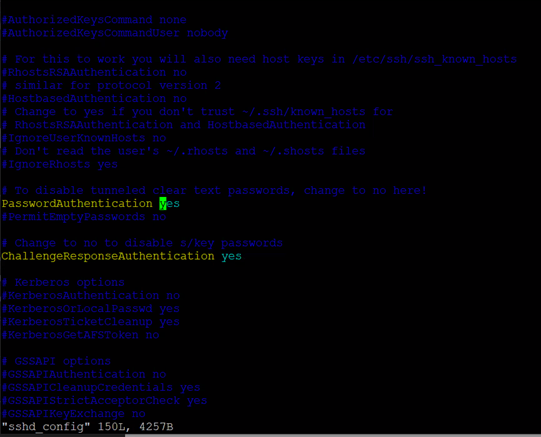
If PasswordAuthentication is set to “no”, change to “yes”, then restart the ssh service.
For example: “systemctl restart sshd.service”.
Affected Products
CloudLink SecureVM, CloudLinkArticle Properties
Article Number: 000210190
Article Type: Solution
Last Modified: 16 May 2026
Version: 6
Find answers to your questions from other Dell users
Support Services
Check if your device is covered by Support Services.