How a Dell Thin Client Receives a Microsoft Terminal Server Client Access License
Summary: This article provides the steps when a Dell Thin Client logged in to a Microsoft Remote Desktop Server (RDS) is issued a Terminal Server Client Access License (TSCAL).
This article applies to
This article does not apply to
This article is not tied to any specific product.
Not all product versions are identified in this article.
Instructions
Affected Platforms:
- Wyse 5060
- Wyse 5070
- Wyse 5070 Extended
- Wyse 5470 All-in-One
- Wyse 5470 Mobile
- OptiPlex 3000 Thin client
Affected Operating Systems:
- Dell ThinOS
- Windows 10 IoT
- Dell Hybrid Client (Ubuntu)
Steps to log in the Dell Thin client to the Microsoft Remote Services:
To connect the Dell thin client to a Remote Desktop Server or a computer that has Microsoft Remote Desktop enabled, you use the Remote Desktop Connection.
- Connect and log in the Dell Thin client into the Remote Desktop server.
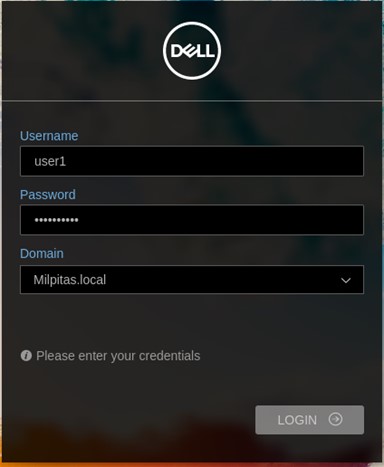
Figure 1: (English Only) ThinOS Log In prompt
- Once the Dell Thin client is logged in to the remote desktop server for the first time, a temporary Client Access License (CAL) is distributed to the device.
- Once the Dell Thin client logs a second time, a permanent CAL is issued to the device.
To determine the TSCAL is being delivered to the thin client:
- Log in to the Microsoft Remote Desktop Server and launch the Server Manager Dashboard.

Figure 2: (English Only) Server Manager Dashboard
- Select the Tools menu > Remote Desktop Servers > Remote Desktop Licensing Manager.
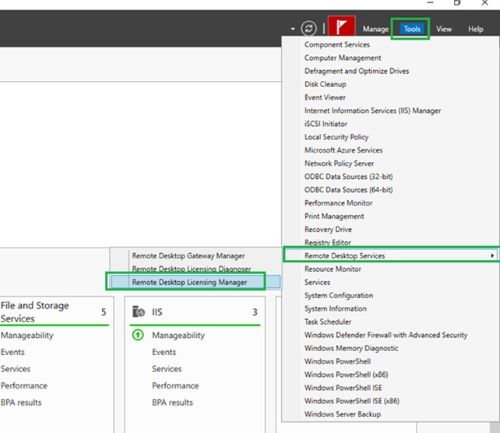
Figure 3: (English Only) Launch the Remote Desktop Licensing Manager
- From the Remote Desktop Licensing Manager window, select the Temporary RDS per Device CAL.
Note: The temporary CAL was issued to the thin client on the first login as an example in Figure 4.

Figure 4: (English Only) RD Licensing Manager Temporary CAL
- Log in to the remote desktop server a second time, select the Installed RDS per Device CAL. A permanent CAL is now issued to the thin client.

Figure 5: (English Only) RD Licensing Manager Permanent CAL
Affected Products
Dell Hybrid Client, OptiPlex 3000 Thin Client, Wyse 5060 Thin Client, Wyse 5070 Thin Client, Wyse 5470 All-In-One, Wyse 5470, Dell ThinOSArticle Properties
Article Number: 000213009
Article Type: How To
Last Modified: 14 May 2024
Version: 2
Find answers to your questions from other Dell users
Support Services
Check if your device is covered by Support Services.