Connectrix: B Series: Facing Invalid header in config file error while performing configdownload command
Summary: This issue is seen while the backed-up switch configuration has been loaded to the switch using the configdownload command.
This article applies to
This article does not apply to
This article is not tied to any specific product.
Not all product versions are identified in this article.
Symptoms
Error: Invalid header in config file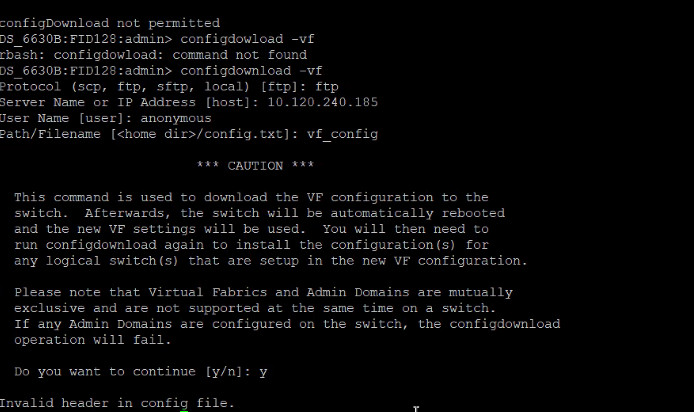
Cause
This issue is due to the difference in the pattern of the switch Banner.
This scenario is encountered during the switch replacement process, where the old switch configuration file contains a different switch banner. The new switch configuration file has a different pattern, resulting in a mismatch.
This scenario is encountered during the switch replacement process, where the old switch configuration file contains a different switch banner. The new switch configuration file has a different pattern, resulting in a mismatch.
Resolution
Step 1: Compare both the old switch configuration file and the new switch configuration file and note the difference in the banner.
Step 2: For example:
Old switch Banner============================================================= ATTENTION: It is recommended that you change the default passwords for all the switch accounts. Refer to the product release notes and the administrator's guide if you need further information. =============================================================
New switch Banner: -------------------------------------------------------------------------------------------- ATTENTION It is recommended that you change the default passwords for all the switch accounts. Refer to the product release notes and the administrator's guide if you need further information. --------------------------------------------------------------------------------------------
Step 3: Manually edit the new switch banner according to the old switch banner.
Step 4: Save the config file and try to perform the configdownload.
Affected Products
Connectrix B-SeriesArticle Properties
Article Number: 000214361
Article Type: Solution
Last Modified: 30 May 2025
Version: 4
Find answers to your questions from other Dell users
Support Services
Check if your device is covered by Support Services.