PowerMax 2500 和 8500:主機無法使用 NVMe/TCP 探索 PowerMax
Summary: 當 PowerMax 上的 NVMe/TCP 端點 (IPPT) 設定為廣告直接探索控制器 (DDC) 模式時,主機無法探索和連線至 PowerMax。
This article applies to
This article does not apply to
This article is not tied to any specific product.
Not all product versions are identified in this article.
Symptoms
受影響的 PoweMaxOS 層級:
Linux 主機上的下列命令可找到已廣告化的服務:

使用下列命令解決網域 (option -r) 失敗。

- 10.0.0.0 (Juniper)
- 10.0.1.0 (Juniper-SR1)
- 10.0.1.x (Juniper-SR1-hotfix)
Linux 主機上的下列命令可找到已廣告化的服務:
avahi-browse -t -v _nvme-disc._tcp
使用下列命令解決網域 (option -r) 失敗。
avahi-browse -t -r -v _nvme-disc._tcp
Cause
問題是功能變數名稱伺服器 (DNS) 記錄服務記錄 (SRV) (HTTPs://en.wikipedia.org/wiki/SRV_record)。
SRV 記錄有一個名為「target」的欄位,目標為提供服務之實體的主機名稱。主機可以使用該主機名稱來擷取 IP 位址。在 PowerMax 中,該機制無法運作,因為「目標」指向了錯誤的主機名稱,如下列查詢回應所示。
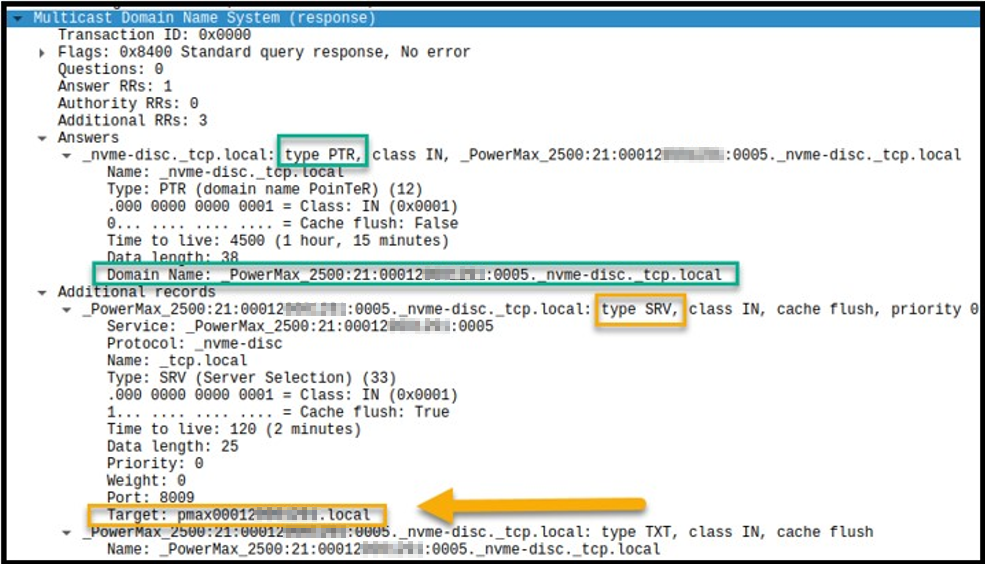
SRV 記錄有一個名為「target」的欄位,目標為提供服務之實體的主機名稱。主機可以使用該主機名稱來擷取 IP 位址。在 PowerMax 中,該機制無法運作,因為「目標」指向了錯誤的主機名稱,如下列查詢回應所示。
除了上述問題外,在建立查詢回應時,格式化問題導致查詢回應RR_TXT資源記錄空白。
Resolution
在 Juniper-SR1-Hotfix:
10.0.1.x (Juniper-SR1-hotfix) - PMOS-59142 上,以下修正程式已解決此問題
10.0.1.x (Juniper-SR1-hotfix) - PMOS-59142 上,以下修正程式已解決此問題
因應措施:
手動設定 DDC IP 位址,即與主機上 IPPT 相關聯的 IP 位址。
Affected Products
PowerMax 2500, PowerMax 8500Article Properties
Article Number: 000217103
Article Type: Solution
Last Modified: 18 May 2026
Version: 7
Find answers to your questions from other Dell users
Support Services
Check if your device is covered by Support Services.