Erreur d’installation d’Alienware Command Center : une erreur DCS de package s’affiche lors de l’installation d’Alienware Command Center version 6.3
Summary: Cet article fournit plus d’informations sur une erreur qui s’affiche lors de l’installation d’Alienware Command Center version 6.3.
This article applies to
This article does not apply to
This article is not tied to any specific product.
Not all product versions are identified in this article.
Symptoms
Lors de l’installation d’Alienware Command Center version 6.3, une erreur « Package DCS Error » s’affiche.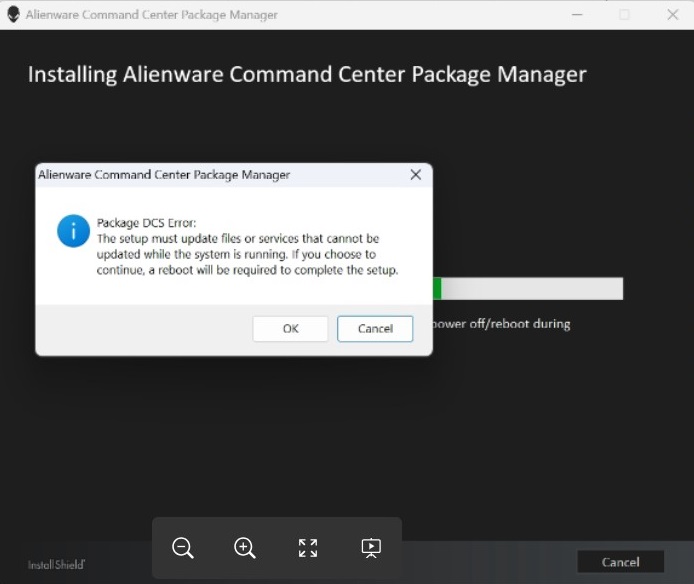
Cause
Le programme d’installation de Dell Core Services ne peut pas fermer Dell.Core.Services.Client.exe et quelques autres processus requis avant d’effectuer l’installation/la mise à niveau.
Resolution
Solution
Solution de contournement pour ce problème :
- Lors de la mise à niveau, lorsque l’erreur s’affiche.
- Cliquez sur OK et l’installation se termine correctement.
- Si l’utilisateur clique sur Annuler et que l’installation s’interrompt. Réexécutez le fichier DUP/IM et sélectionnez l’option « Add Packages » sur la page de maintenance IM.
Alienware Command Center version 6.4
Un correctif pour ce problème sera implémenté dans Alienware Command Center version 6.4 (la date de publication prévue est le 24 septembre 2024).
Affected Products
Alienware Aurora R15, Alienware Aurora R16, Alienware Mechanical Gaming Keyboard | AW310K, Alienware RGB Mechanical Gaming Keyboard AW410K, Alienware Tenkeyless Gaming Keyboard AW420K, Alienware Low-Profile RGB Mechanical Gaming Keyboard | AW510K
, Alienware m15 R7, Alienware m16 R2, Alienware m17 R5 AMD, Alienware m18 R2, Alienware Wireless Gaming Mouse AW310M, Alienware RGB Gaming Mouse AW510M, Alienware Wired/Wireless Gaming Mouse AW610M, Alienware Tri-Mode Wireless Gaming Mouse AW720M, Alienware x14, Alienware x14 R2, Alienware x15 R2, Alienware x16 R2, Alienware x17 R2, Alienware m16, Alienware m18, Alienware x16, Alienware Tri-Mode Wireless Gaming Headset AW920H, Alienware Wired Gaming Mouse AW320M, Alienware Pro Wireless Gaming Mouse, Alienware Tri-Mode Wireless Gaming Keyboard AW920K, Alienware Wired Gaming Headset AW520H, Alienware Dual Mode Wireless Gaming Headset AW720H, Alienware 25 Gaming Monitor AW2523HF, Alienware 500Hz Gaming Monitor AW2524H, Alienware 27 Gaming Monitor AW2724DM, Alienware 27 Gaming Monitor AW2724HF, Alienware 27 360Hz QD OLED Gaming Monitor AW2725DF, Alienware 32 4K QD OLED Gaming Monitor AW3225QF, Alienware 34 Curved OLED Monitor AW3423DW, Alienware 34 Curved QD OLED Gaming Monitor AW3423DWF, Alienware 25 Gaming Monitor AW2521H, Alienware 25 Gaming Monitor AW2521HF, Alienware 25 Gaming Monitor AW2521HFA, Alienware 25 Gaming Monitor AW2521HFL, Alienware 25 Gaming Monitor AW2521HFLA, Alienware 27 Gaming Monitor AW2720HF, Alienware 27 Gaming Monitor AW2720HFA, Alienware 27 Gaming Monitor AW2721D, Alienware AW3420DW, Alienware 38 Curved Gaming Monitor AW3821DW, Alienware 55 OLED Monitor AW5520QF, Dell G15 5530, Dell G16 7630
...
Article Properties
Article Number: 000226835
Article Type: Solution
Last Modified: 21 May 2026
Version: 4
Find answers to your questions from other Dell users
Support Services
Check if your device is covered by Support Services.