Connectrix SANnav: Unable to launch Webtools due to "Failed to launch Web Tools. Authentication failed/Password is empty"
Summary: Unable to open Webtools console through SANnav Web client with Admin and AAA users.
This article applies to
This article does not apply to
This article is not tied to any specific product.
Not all product versions are identified in this article.
Symptoms
The Symptoms are as follows:
- Unable to open the Webtools console through SANnav Web client.
- Receive a
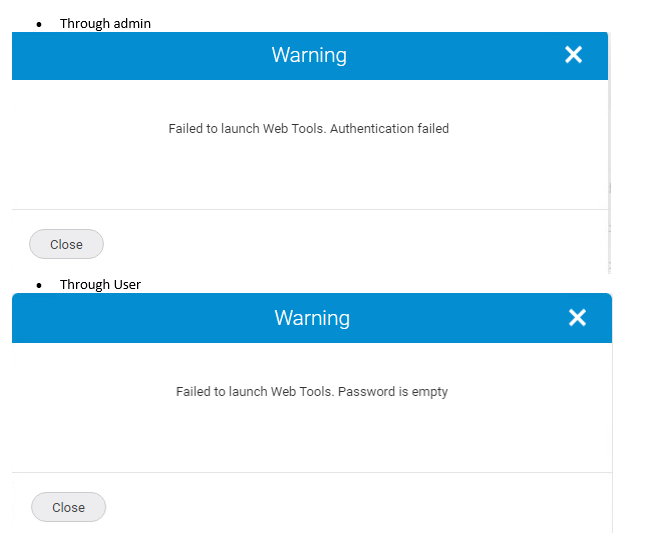
"Password Empty"error with AAA user and"Authentication failed"with admin account.
Screenshots:
Cause
The issue is caused by the incorrect configuration of the SANnav Web client, the dcm.server.webtools.sso setting.
The dcm.server.webtools.sso setting was set to 3, which is not a valid value for this setting.
This incorrect setting prevents the Webtools console from opening through the SANnav Web client.
Resolution
To resolve the issue of unable to open the Webtools console through SANnav Web client, follow these steps:
1. Stop the server by running the following command:
/install_home/bin/stop-server.sh
2. Edit the server properties file by running the following command:
vi /install_home/conf/server.properties
Change the line:
dcm.server.webtools.sso=3

to:
dcm.server.webtools.sso=1
3. Reboot the system.
4. Start the server by running the following command:
/install_home/bin/start-server.sh
Attempt to run Web Tools again from SANnav.
Verify that the issue has been resolved by checking if Web Tools can be opened successfully.
Additional information from the install guide:
• 0 - for always login manually. SANnav prompts for switch login credentials.
• 1 - to log in with switch credentials. SANnav does not prompt, but attempts to log in to the switch using the credentials that SANnav used when discovering the switch.
• 2 - to log in with user credentials. SANnav does not prompt, but attempts to log in to the switch using the credentials that the user used when logging in to SANnav.
For switches running Fabric OS versions earlier than 9.0.0, SANnav always prompts to log in to the switch when launching Web Tools, regardless of the SSO settings.
Note:
When using TACACS, RADIUS, or LDAP, the system typically does not store passwords locally to avoid security vulnerabilities. Instead, it verifies credentials directly with the AAA server.
In the case of SANnav, if it is showing a "Password Empty" error, it might be because the system is not able to retrieve or verify the password from the AAA server.
Affected Products
Connectrix B-Series Fabric OS 9.X, Connectrix B-Series Hardware, Connectrix SANnavArticle Properties
Article Number: 000263400
Article Type: Solution
Last Modified: 20 Jan 2025
Version: 1
Find answers to your questions from other Dell users
Support Services
Check if your device is covered by Support Services.