L'upload del modello AMDX di Dell Command Update non riesce in Microsoft Intune
Summary: Questo articolo fornisce informazioni sull'errore che si verifica durante il caricamento di Dell Command | Aggiornamento (DCU) . Modello ADMX in Microsoft Intune.
This article applies to
This article does not apply to
This article is not tied to any specific product.
Not all product versions are identified in this article.
Symptoms
Prodotti interessati:
- Dell Command | Update
Lo stato indica Upload failed quando si tenta di importare Dell Command | Update Modello ADMX in Microsoft Intune.
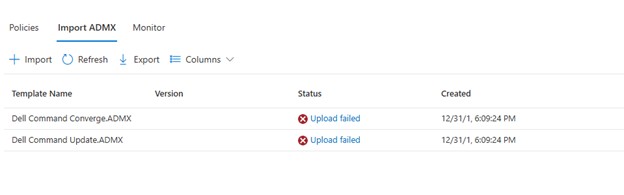
Cliccando su Upload failed, viene visualizzato:
ADMX file: Dell Command Update.ADMX
State: failed
Last modified date: xx/xx/xxxx
Error Details: ADMX file referenced not found NamespaceMissing:Dell.Policies. Please upload it first.
Cause
La base Dell.ADMX e Dell.ADML I file modello devono essere caricati prima di poter caricare qualsiasi AMDX specifico dell'applicazione.
Resolution
I modelli ADMX possono essere estratti dalla directory Dell Command | Update pacchetto di installazione. Carica il file Dell.ADMX e Dell.ADML prima i file. Quindi, caricando il file Dell Command Update.ADMX e Dell Command Update.ADML Viene completato correttamente.
Nota: Per ulteriori informazioni su come estrarre i modelli dal pacchetto di installazione, consultare Come accedere a . AMDX e . File ADML da utilizzare con Dell Command Update.
Affected Products
Dell Command | UpdateArticle Properties
Article Number: 000290019
Article Type: Solution
Last Modified: 15 Jul 2026
Version: 5
Find answers to your questions from other Dell users
Support Services
Check if your device is covered by Support Services.