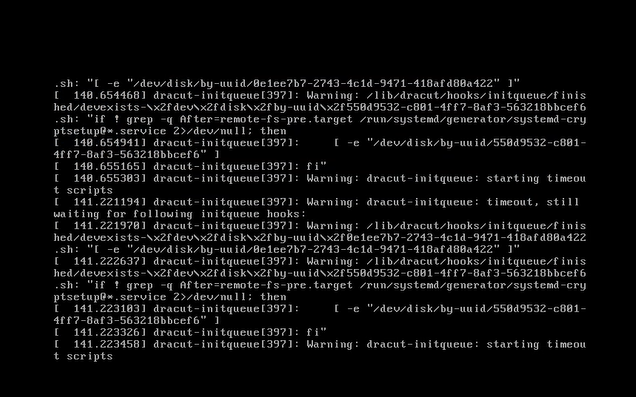
PPDM Virtual Machine is not booting Warning: dracut-initqueue: starting timeout scripts
Summary: PowerProtect Data Manager (PPDM) fails to boot up with "Warning: dracut-initqueue: starting timeout scripts" after changing the Small Computer System Interface (SCSI) controller from "LSI Logic Parallel" ...
This article applies to
This article does not apply to
This article is not tied to any specific product.
Not all product versions are identified in this article.
Symptoms
Boot Issue with PowerProtect Data Manager
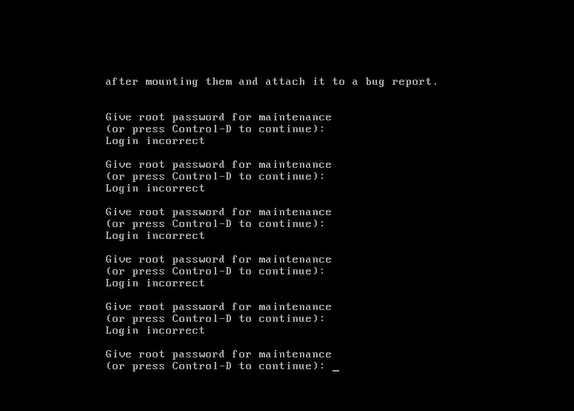
PPDM virtual machine is not booting up with the warning message shown in the console: "Warning: dracut-initqueue: starting timeout scripts"
Cause
Root Cause of the Issue
The root cause of the issue is related to the configuration of the PPDM SCSI controller.
- The PPDM SCSI controller was changed to something other than "LSI Logic Parallel."
This change in the controller configuration led to the PPDM boot issue
Resolution
PPDM Boots Issue Resolution.
To resolve the PPDM boot issue, change the PPDM SCSI controller to "LSI Logic Parallel."
This can be done by modifying the settings of the PPDM virtual machine in vSphere.
After making this change, the PPDM instance should boot up without issue.
Affected Products
PowerProtect Data ManagerArticle Properties
Article Number: 000357133
Article Type: Solution
Last Modified: 23 May 2026
Version: 3
Find answers to your questions from other Dell users
Support Services
Check if your device is covered by Support Services.