Dell Security Management Server Virtual Upgrade が Interfaces.d で失敗する
Resumen: Dell Security Management Server Virtual アプライアンスのアップグレードが interfaces.d ディレクトリを参照するエラーで失敗します。
Este artículo se aplica a:
Este artículo no se aplica a:
Este artículo no está vinculado a ningún producto específico.
En este artículo no se identifican todas las versiones de los productos.
Síntomas
対象製品:
- Dell Security Management Server Virtual
影響を受けるバージョン:
- v10.2.9~v10.2.11
対象オペレーティング システム:
- Linux
Dell Security Management Server Virtual のアップグレードが停止し、 Failed to restore from backup file: というメッセージが表示されます。これは、etc/network/interfaces ディレクトリ内のファイルのリストアを試行した後に発生します。
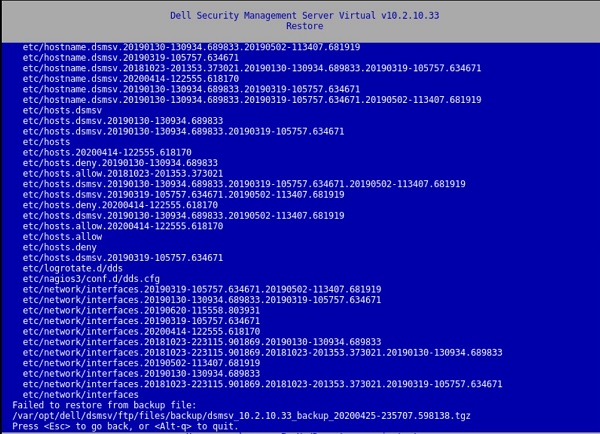
図1: (英語のみ)Restoreは、 Failed to restore from backup file を返します。
次のキーの結果をウィンドウで押します。
[Errno 21] Is a directory:
‘/etc/network/interfaces.d’.
このエラーは、/var/log/messagesファイルにも存在します。
![[Errno 21]ディレクトリは次のとおりです。「/etc/network/interfaces.d」](https://supportkb.dell.com/img/ka06P000000Put3QAC/ka06P000000Put3QAC_ja_6.jpeg)
図2:(英語のみ)[Errno 21] Is a directory: ‘/etc/network/interfaces.d’
Causa
-
Resolución
この問題を解決するには、手順に従って interfaces.d ディレクトリの名前を変更します。
- Dell Security Management Server Virtual Console にログインします。
- Dell Security Management Server Virtual管理コンソールで、[Launch Shell]を選択します。
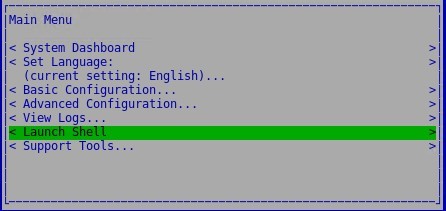
図3:(英語のみ)シェルの起動
- コマンド
su dellsupportをdellsupport使用して、ユーザー アカウントに切り替えます。

図4:(英語のみ)に切り替える dellsupport
dellsupportユーザーのパスワードを入力します。デフォルトでは、このパスワードはdellsupportです。

図5:(英語のみ)パスワードを入力します
- 次のコマンドを使用して、interfaces.dディレクトリの名前を変更します。
sudo mv /etc/network/interfaces.d /etc/network/interfaces.old

図6:(英語のみ)sudo mv /etc/network/interfaces.d /etc/network/interfaces.oldと入力する
- と入力
exitするか、2回使用してシェルを終了し、ユーザー インターフェイスを使用ctrl-dしてアップグレードを実行します。
サポートに問い合わせるには、「Dell Data Securityのインターナショナル サポート電話番号」を参照してください。
TechDirectにアクセスして、テクニカル サポート リクエストをオンラインで生成します。
さらに詳しい情報やリソースについては、「デル セキュリティ コミュニティー フォーラム」に参加してください。
Información adicional
Vídeos
Productos afectados
Dell EncryptionPropiedades del artículo
Número de artículo: 000131146
Tipo de artículo: Solution
Última modificación: 06 jul 2023
Versión: 10
Encuentra las respuestas que necesitas con la ayuda de otros usuarios de Dell
Servicios de asistencia
Comprueba si tu dispositivo está cubierto por los servicios de asistencia.