How to Download the CrowdStrike Falcon Sensor
Resumen: Learn how to download CrowdStrike Falcon Sensor by following these instructions.
Este artículo se aplica a:
Este artículo no se aplica a:
Este artículo no está vinculado a ningún producto específico.
En este artículo no se identifican todas las versiones de los productos.
Instrucciones
Note: The process to download CrowdStrike Falcon Sensor is the same regardless of if it is purchased from Dell or CrowdStrike.
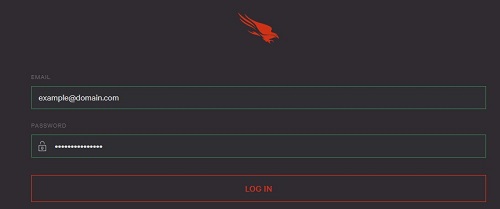
- In a web browser, go to https://falcon.crowdstrike.com/login/
.
- Log In to the Falcon Console.
- In the left menu pane, click Host setup and management and then select Sensor Downloads.
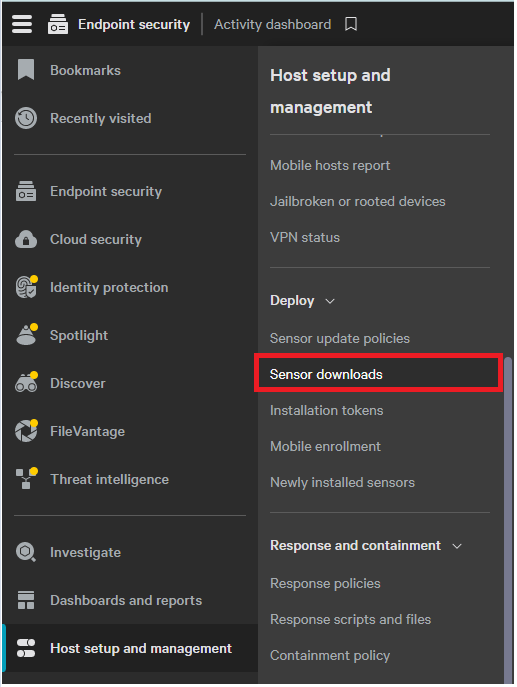 Note: The layout in the example may differ slightly from your environment.
 - Click the Download icon on the appropriate operating system.
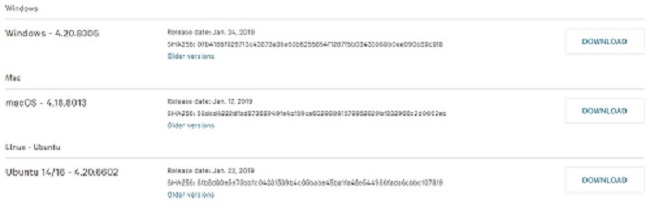 Note: The operating system versions may differ from the example.
To contact support, reference Dell Data Security International Support Phone Numbers.
Go to TechDirect to generate a technical support request online.
For additional insights and resources, join the Dell Security Community Forum.
Productos afectados
CrowdStrikePropiedades del artículo
Número de artículo: 000156053
Tipo de artículo: How To
Última modificación: 04 may 2026
Versión: 18
Encuentra las respuestas que necesitas con la ayuda de otros usuarios de Dell
Servicios de asistencia
Comprueba si tu dispositivo está cubierto por los servicios de asistencia.