Avamar – insticksprogramstypen visas som tom i AUI-instrumentpanelen
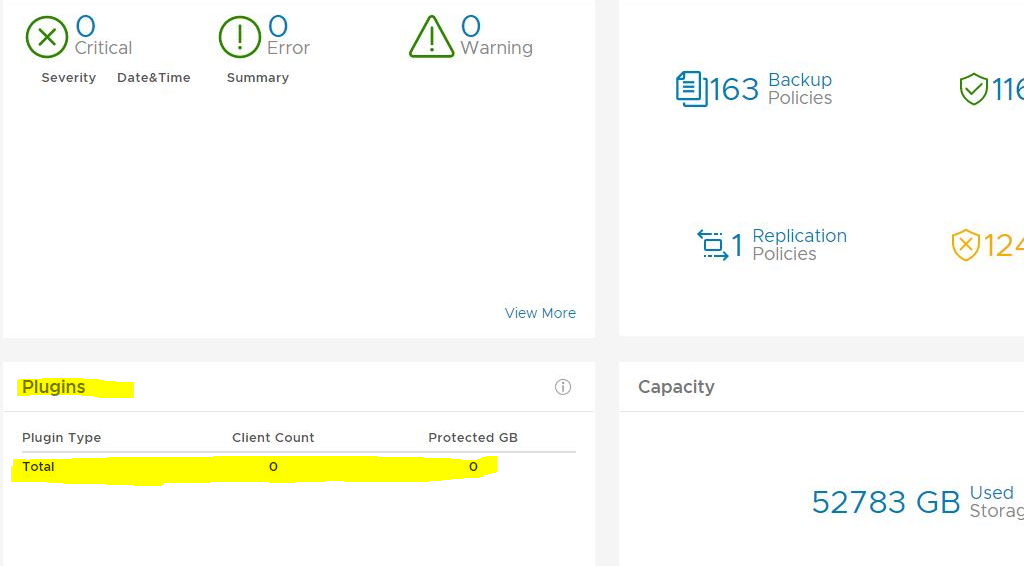
Resumen: På skärmen Plugins på Avamar AUI Dashboard är det totala antalet för insticksprogram noll.
Este artículo se aplica a:
Este artículo no se aplica a:
Este artículo no está vinculado a ningún producto específico.
En este artículo no se identifican todas las versiones de los productos.
Síntomas
På AUI Dashboard visas att insticksprogramsrutan är tom:
Causa
Det finns ingen post i report_history-tabellen för rapport-ID för INIT_RPT_ACT_BYTES_PROT_PI. Det här läggs till i det dagliga schemat när det har körts.
Resolución
Kör statistikrapporten
activities-plugin i hanteringskonsolens användargränssnitt (MCGUI).I användargränssnittet går du till --> Tools --> Manage Reports --> Activities-Plugin stats.
Kontrollera insticksprogrammets information igen i AUI-instrumentpanelen. Det bör vara korrekt. Exempel nedan.

activities-plugin i hanteringskonsolens användargränssnitt (MCGUI).I användargränssnittet går du till --> Tools --> Manage Reports --> Activities-Plugin stats.
Kontrollera insticksprogrammets information igen i AUI-instrumentpanelen. Det bör vara korrekt. Exempel nedan.
Propiedades del artículo
Número de artículo: 000212094
Tipo de artículo: Solution
Última modificación: 29 jun 2023
Versión: 2
Encuentra las respuestas que necesitas con la ayuda de otros usuarios de Dell
Servicios de asistencia
Comprueba si tu dispositivo está cubierto por los servicios de asistencia.